 Adchestra
MCP in three sentences
MCP (Model Context Protocol) is an open standard that lets an AI assistant like Claude or ChatGPT connect to other programs and read their data. Anthropic announced it on 25 November 2024, and the official MCP site describes it as an open-source standard for connecting AI applications to external systems. For you it means one thing: instead of guessing about your Google Ads account, the AI can open it and look.
The official site compares MCP to a USB-C port. I think that is a good comparison, with one limit I will come back to. A USB-C cable fits any laptop and any charger, because everyone agreed on the shape of the plug. MCP is the same agreement for AI: any assistant that speaks it can plug into any program that speaks it. The limit: a plug that fits does not mean everything is allowed. What flows through it depends on what the program on the other end offers, and that is the part you need to understand.
This guide is for people who run ads and use Claude or ChatGPT, and who have never opened a terminal. You do not need one. It takes about ten minutes to read, and the other guides on this blog link here when they use the term.
Why a marketer should care
Without MCP, an AI answers from memory. It has read a lot about Google Ads, but it has never seen your account. So it invents menus that moved two years ago, and it gives numbers that sound right and are not. In my keyword test, Claude overstated most search volumes from memory, some by five times, though it did say they were rough estimates.
With MCP, the AI reads your real account and answers from that. And a good assistant knows the difference. When I asked Claude about my rankings with no data connected, it refused to guess and told me where to get the data. Once the data is connected, it can read it.
That is the whole value. Same AI, but it reads your numbers instead of making them up.
The words people use, explained once
Search for MCP and you meet a pile of words. Most of them mean something simple.
- MCP is the standard, the agreed shape of the plug. It is not a product and you cannot buy it.
- A server (an MCP server) is a program that offers things the AI can use. Despite the name, you do not have to own a machine. Most servers you will meet run on the internet and you only need their address, which looks like
https://something.com/mcp. - A client is the AI app that connects to the server. Claude, ChatGPT and Codex are clients. It is called a client because it asks and the server answers.
- A tool is one action a server offers, like "list my campaigns" or "get search terms". A server is a box of tools. The AI picks which tool to use.
- Remote versus local. A remote server runs on the internet and you paste its address. A local server runs on your own computer, and you install and start it. Remote is easier for a marketer: nothing to install, and it works when your laptop is closed. Anthropic says Claude connects to remote servers from its cloud, not from your device.
- OAuth sign-in is the "sign in with Google" button. You log in on Google's own page and approve what the server may see. The AI never gets your password.
- A connector is Claude's name for an MCP server once it is added to Claude. A plugin is what ChatGPT calls it now (it used to say "connector", then "app"). Same thing, different names.
The names differ between apps, so here is what you will see on screen. The pages that show the exact clicks are linked once each.
| App | What it calls a server | Where you add one | Exact clicks |
|---|---|---|---|
| Claude | Connector (a custom connector, if you added it yourself) | The Plugins page, then Add, then Add custom connector. Anthropic's help page still calls this page Customize, then Connectors. | How to add a custom connector to Claude |
| ChatGPT | Plugin (earlier called a connector, then an app) | The Plugins page, then Add, then Add custom MCP server. | How to add an MCP server to ChatGPT |
| Codex | MCP server | In the app, Settings, then MCP servers, then Add server. In a terminal, the command codex mcp add. | How to add an MCP server to Codex |
People also search "Claude connectors vs MCP" as if these were two products. They are not. MCP is the standard, and a connector is how one MCP server shows up inside Claude.
What happens when you ask a question
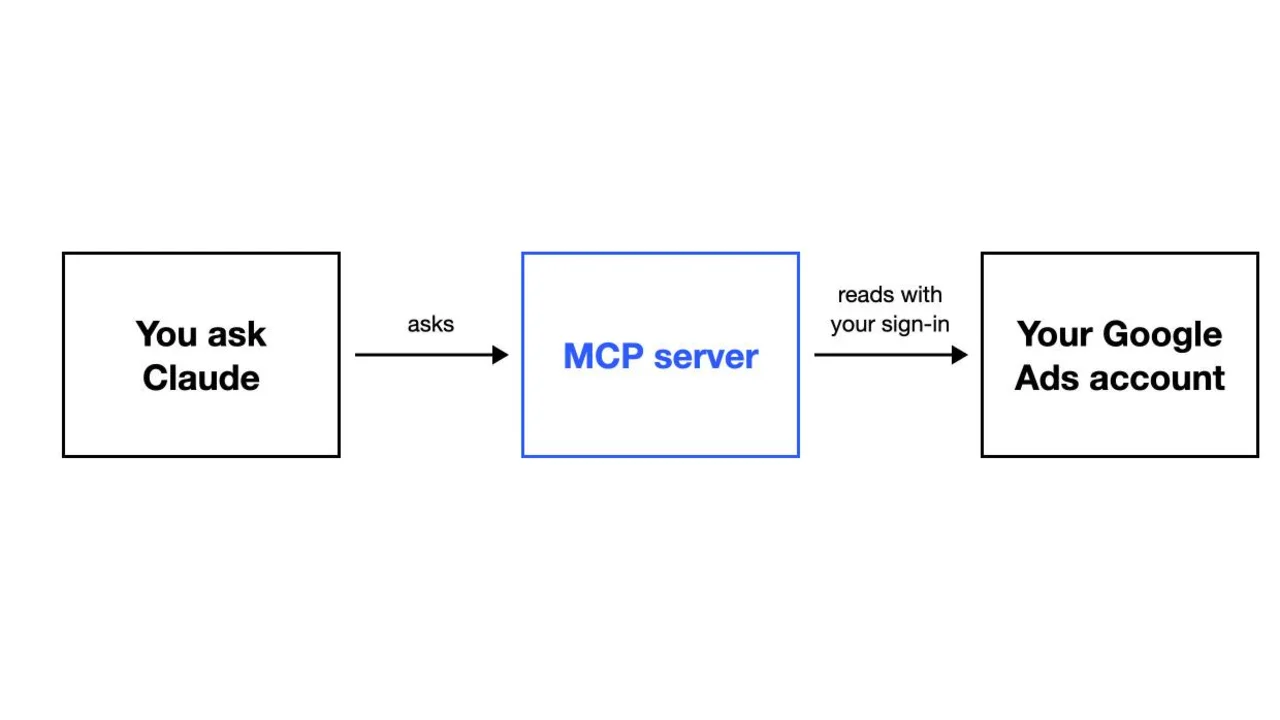
Say you type: "Which campaigns spent the most last week?" Five things happen, usually in a few seconds.
- You ask. You type the question in Claude or ChatGPT, as always.
- The AI picks a tool. It sees the list of tools the server offers and chooses one that fits, for example "get campaign performance". You can usually see this as a small line in the chat, such as "Used a tool".
- The server calls Google with your sign-in. The server asks Google Ads for the data. It does this as you, with the access you approved when you signed in.
- The data comes back. Google answers the server, and the server hands the rows to the AI.
- The AI answers. It reads the rows and writes the answer in plain words, with your real numbers.
If your question asks for a change, such as pausing a campaign, there is one more step before step 3 finishes: your approval. The AI app can ask before it runs a tool. In Claude, you choose per tool whether it is always allowed or needs your approval. In ChatGPT, write actions require confirmation by default. Some servers add their own safety on top, such as showing a preview of the change first. Read it before you say yes.
What a server can and cannot do
Three rules explain almost everything.
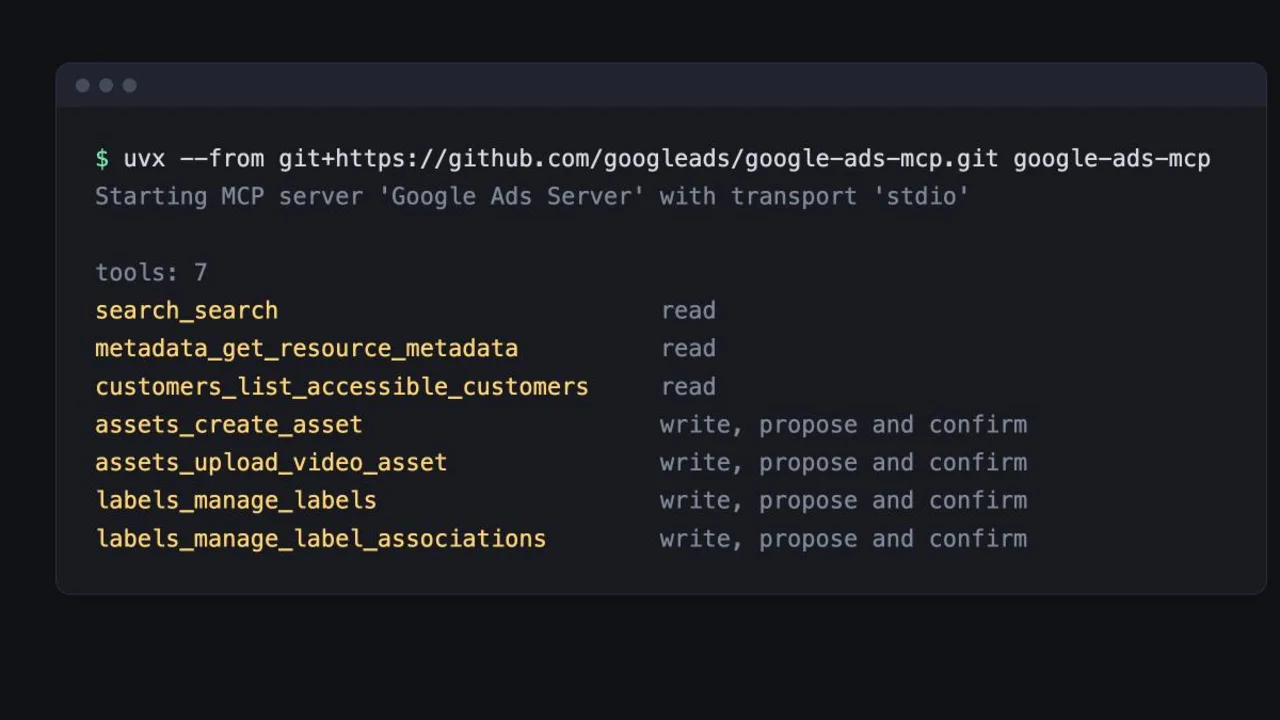
1. It only does what its tools allow. If a server has a tool for reading campaigns and none for changing budgets, the AI cannot change budgets, however politely you ask. This is why two Google Ads servers can feel completely different. Google's own server has seven tools. Others have dozens.
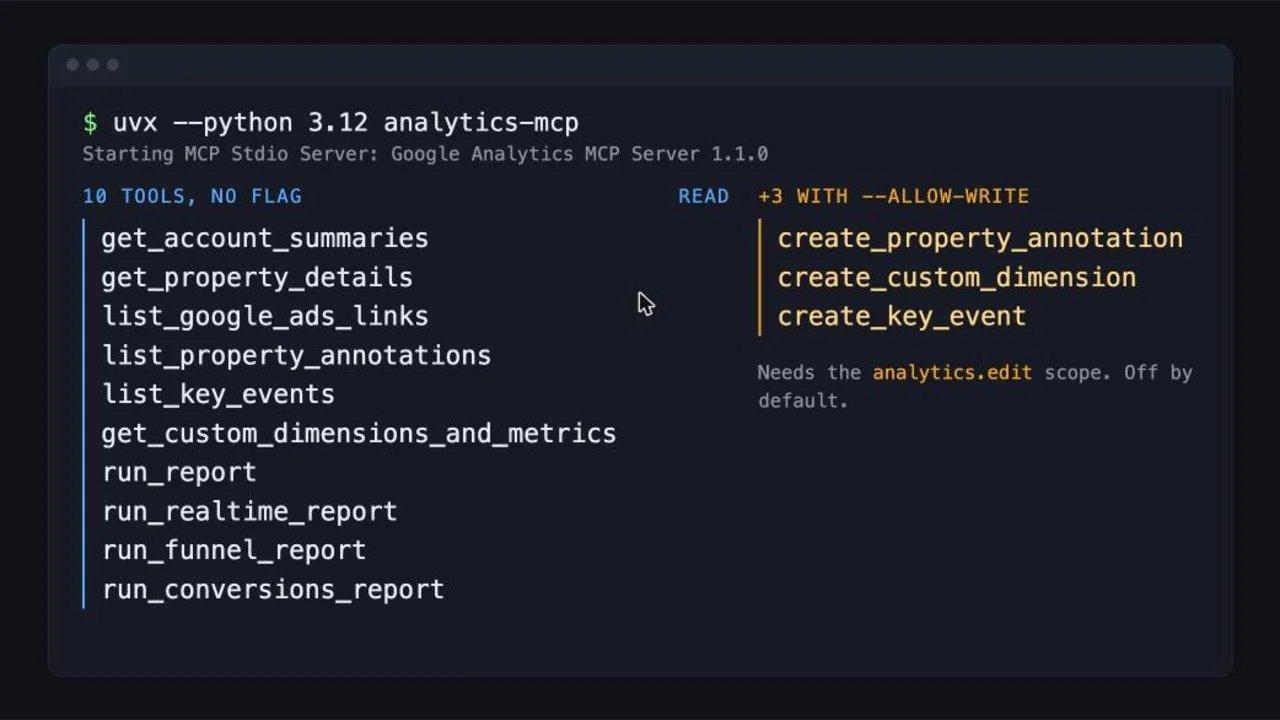
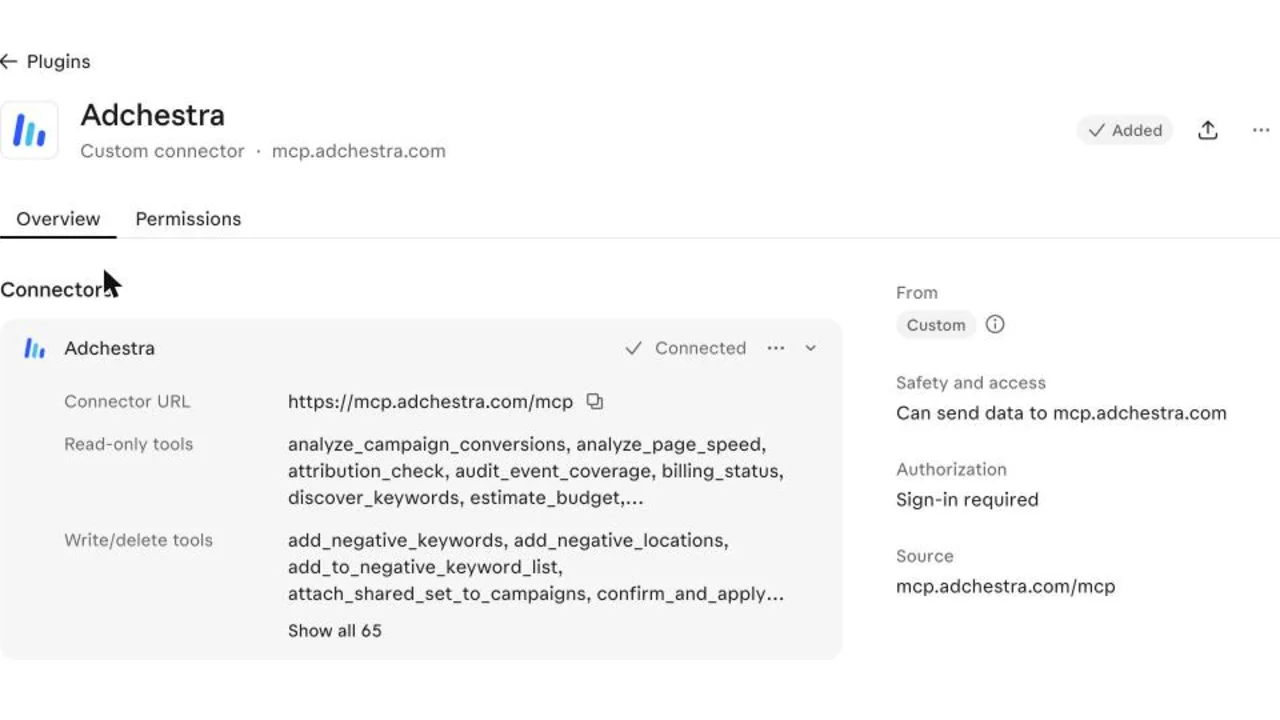
2. Reading is not changing. Reading changes nothing, so a mistake costs you nothing. Changing is where the risk is. Claude shows this split on every connector's page: a list of Read-only tools and a list of Write/delete tools.
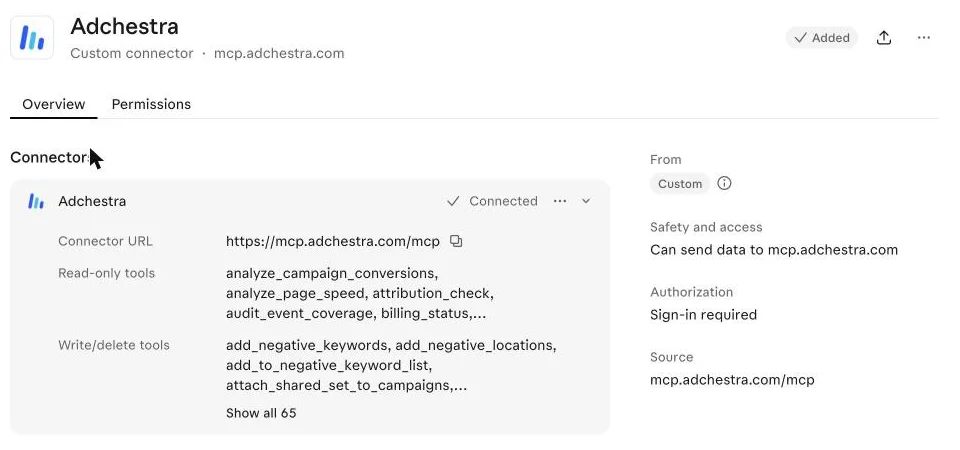
3. It sees what your sign-in sees. The server acts as you. If your Google account can open ten ad accounts, the server can reach all ten. If you only have read access to an account, the server can only read it. Sign in with the account that has the access you want the AI to have, and no more.
My habit: let reading run freely, and keep anything that changes or deletes on "ask me first".
Is an MCP server safe?
As safe as whoever runs it. A server is a program that sits between your AI and your data, so you are trusting it. Anthropic's advice is to connect only to servers built and hosted by organizations you trust, and warns that a malicious server can hide instructions meant to make Claude act in ways you did not intend. OpenAI says the same: only connect to MCP servers you trust, because an untrusted one may access or steal information shared through the app. The MCP project has its own security best practices.
Who can see your data
- The server's operator. Your questions pass through their program, and so does the data it fetches for you. Claude's connector page says this plainly under Safety and access: it can send data to the server's address.
- The AI provider. Whatever the server returns lands in your chat, so Anthropic or OpenAI handles it like anything else you type.
- Google. It sees the requests, as it would from any app you sign in to.
Check four things before you connect one
- Who runs it. A company you can name, or Google itself, or you? Not an anonymous project from a forum.
- What it asks permission for. Read the sign-in screen. A reporting tool that wants permission to change your account should make you stop.
- Whether changes need your approval. Ideally the server shows a preview and the AI app asks too.
- What the tool list says. Open the connector's page and read the write tools. If you do not need them, set them to Blocked.
How to disconnect and revoke
Two steps, because removing the connector in the AI app does not always cancel the sign-in on the other side. First remove it: in Claude, open the connector's page and choose Remove from the three-dot menu. In ChatGPT and Codex, use the same screen you added it from. Then revoke it where you signed in. Anthropic says you can revoke a connector's access in the third-party service's security settings. For Google, that is the third-party apps and services page of your Google account.
Which Google marketing products have a server
It depends on the product. This is what I found when I searched for each.
- Google Ads. Yes. Google publishes an official server. It runs on your own computer and needs a Google Cloud project, so it is not a five-minute job. Google Ads MCP server: what it is and how to set it up has the full detail.
- Google Analytics. Yes. Google also publishes an official one, with its own setup page.
- Search Console. No. Google publishes none, and everything you find is someone else's project. I wrote up the routes that work in How to connect Claude to Search Console.
- Tag Manager. No. Google publishes none either. See How to connect Claude to Google Tag Manager.
If you want one address that covers all four with a Google sign-in and nothing to install, Adchestra is a hosted MCP server built for that, and it shows every change as a preview first.
Frequently asked questions
What does MCP stand for?
Model Context Protocol. "Model" is the AI, "context" is the information it works with, and "protocol" is an agreed way of talking. It was created at Anthropic and announced in November 2024. It is open, so any company can use it, and the official site lists Claude and ChatGPT among the assistants that support it.
What is an MCP server, in one line?
A program that gives an AI assistant a set of tools, like "list my campaigns", and runs them when the AI asks. You paste its address into Claude or ChatGPT and sign in.
Do I need to code, or use a terminal?
No, not for a remote server. In Claude and ChatGPT you paste an address into a form and sign in. A terminal only comes in for local servers and for Codex's command line.
Can an MCP server change my ads without asking me?
Only if two things allow it: the server has a tool that changes things, and you let the AI use it without asking. Both can be turned off. Claude lets you set each tool to Needs approval or Blocked, and ChatGPT asks to confirm write actions by default. A server with only read tools cannot change anything.
Is MCP free?
The standard is free and open. Servers vary. Google's official ones are free to run yourself. Hosted ones may charge. Your Claude or ChatGPT plan has its own rules, and on Claude's free plan only one custom connector is allowed.