 Adchestra
A connector is just an MCP server with a nicer name
People search "Claude connectors vs MCP" as if they were two products. They are not. An MCP server is a program that gives an AI assistant tools it can use, like "list my campaigns" or "read this file". MCP (Model Context Protocol) is the standard it speaks. A connector is what Claude calls an MCP server once it appears inside Claude. Same thing, friendlier word. A custom connector is one you add yourself by pasting its address.
This guide shows the exact clicks to add one, how to switch it on in a chat, how to control what Claude may do with it, and what to do when it breaks. It takes about five minutes. I use Adchestra's server as the example. The same steps work for any server address.
One warning before the clicks: Claude's screens keep changing names. Anthropic's help pages still say Customize, then Connectors. On my account today, the left menu says Plugins. It is the same page.
Remote or local: which kind do you have?
Every MCP server is one of two kinds, and they are added in different places. Check which one you have before you click anything.
| Kind | What it is | Where it works | How you add it |
|---|---|---|---|
| Remote | A program running on the internet. You get an address that looks like https://something.com/mcp. You paste the address and sign in. | Claude on the web, Claude Desktop and Cowork. Anthropic says Claude connects from Anthropic's cloud, not from your device. | Plugins, then Add. On older menus: Customize, then Connectors, then Add. This guide. |
| Local | A program that runs on your own computer. You install it, and Claude Desktop starts it. | Claude Desktop only. It does not exist for Claude on the web. | Settings, then Developer, then Edit Config, then a JSON file. See the section on local servers below. |
My advice: if a remote address exists, use it. There is nothing to install, nothing to update, and it keeps working when Claude Desktop is closed. A local server is for things only your own computer can reach, like a folder of files.
Which plans can add a custom connector
All of them, with one catch. Anthropic's help page lists Free, Pro, Max, Ultra, Team and Enterprise.
| Your plan | Can you add a custom connector? |
|---|---|
| Free | Yes, but only one custom connector in total. |
| Pro, Max, Ultra | Yes. You add it yourself from your own account. |
| Team | Only an Owner or Primary Owner can add it, under Organization settings, then Connectors. Members then connect it themselves. |
| Enterprise | Owners, Primary Owners and people with a custom role that includes Manage access to Libraries can add it. Everyone else connects it themselves afterwards. |
If you are a Team or Enterprise member and the Add option is missing, nothing is broken. Ask an owner to add it, then go to Connectors yourself and click Connect next to it. The owner's steps are the same as the ones below, except they start in Organization settings and hover over Custom, then choose Web.
Open the Add custom connector form
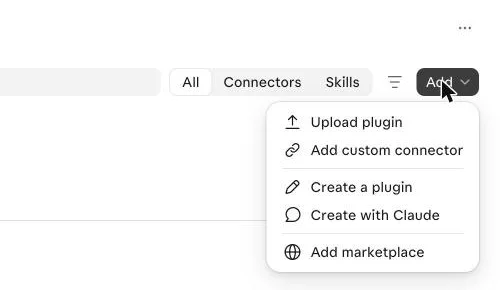
- Go to claude.ai/customize/connectors. It lands on a page titled Plugins. You can also click Plugins in the left menu.
- Click the black Add button at the top right.
- Choose Add custom connector. The other entries (Upload plugin, Create a plugin, Create with Claude, Add marketplace) are for people building plugin packages. Ignore them.
Fill in the form
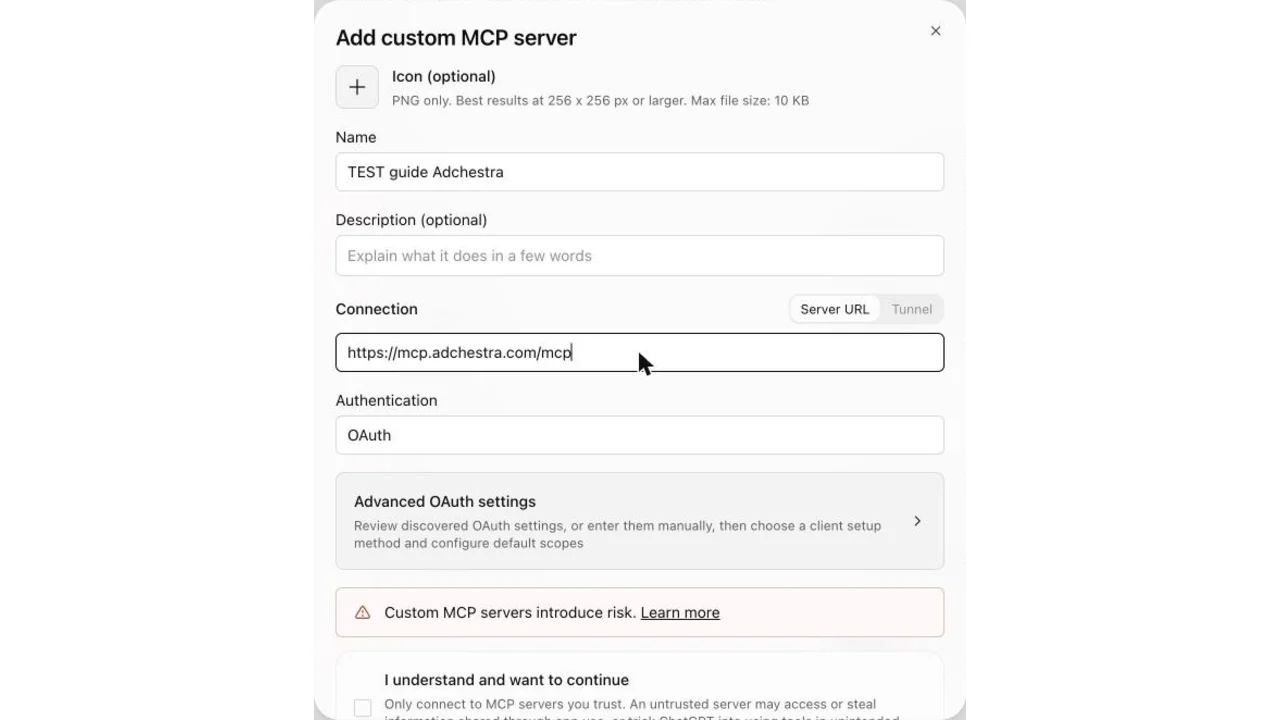
The form has two fields and a Continue button.
- Name. This is what appears in your list of connectors. Keep it short. I used
Adchestrafor my real one. - MCP server URL. The HTTPS address of the server, exactly as its documentation gives it, including the path at the end. Claude's own example is
https://mcp.example.com/mcp. - Click Continue.
https://mcp.adchestra.com/mcp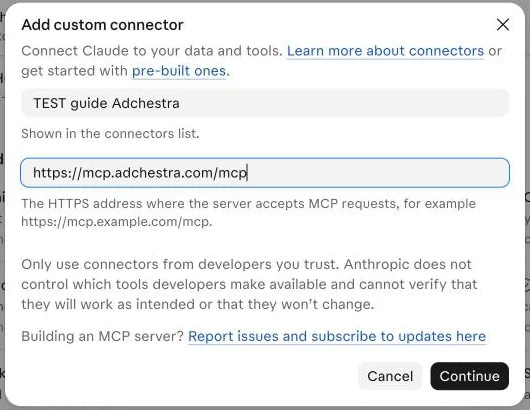
After Continue, Claude checks the server and, per Anthropic's steps, shows the sign-in settings it detected. Change them only if the server's documentation tells you to:
- Authentication has three choices: Sign in now, Sign in when needed and No sign in.
- OAuth client (OAuth is the "sign in with your account" standard, so Claude never sees your password) has three choices: Use Claude's published identity (Recommended), Register automatically and Use your own OAuth client. Pick your own only if the server gives you a client ID and secret.
- Request headers are for servers that use a fixed API key or token instead of a sign-in.
Then click Add. Anthropic also warns that the server must be reachable from the public internet on the standard HTTPS port 443, so an address with a port like :8443, or a server behind a VPN, will not connect.
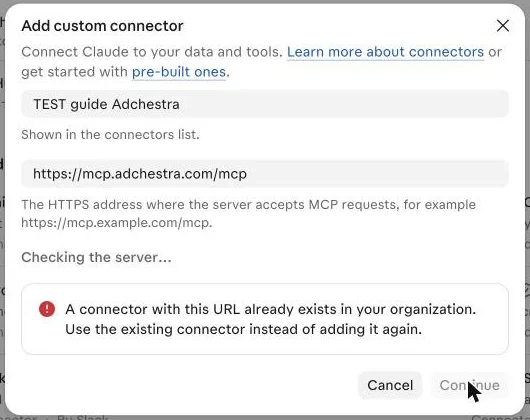
A small thing I ran into: I tried to add the Adchestra address a second time under another name, and Claude refused.
Sign in to the server
- Claude sends you to the server's own sign-in page. For Adchestra, that is Google's account chooser.
- Pick the account, read the permissions it asks for and approve.
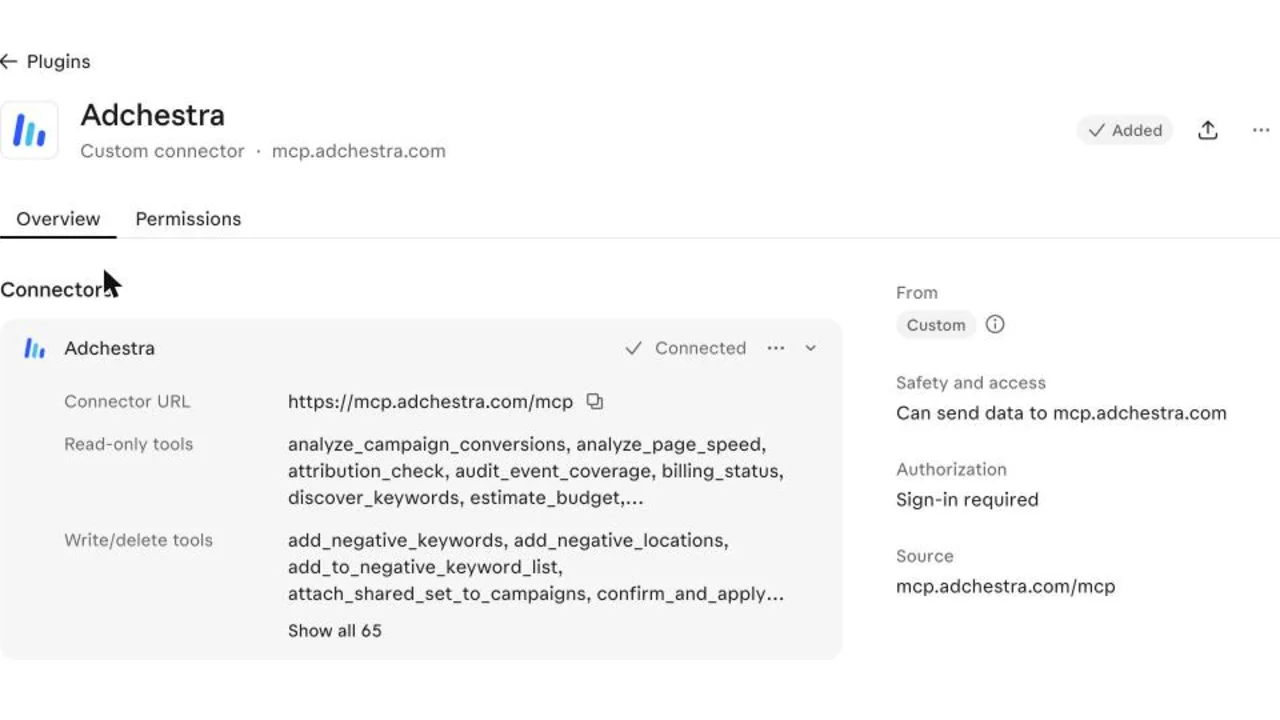
- You land back in Claude. On the connector's page, a Connected label shows next to its name.
If you close the window halfway, open the connector's page and click Connect. Anthropic's advice for any failed sign-in is the same: disconnect and reconnect from Customize, then Connectors.
Switch the connector on in a chat
Being connected is not the same as being switched on in the chat you are typing in. Check it every time you wonder why Claude "forgot" the tools.
- Start a new chat.
- Click the + button at the left of the message box.
- Hover over Plugins. (Anthropic's help page calls this entry Connectors. On my screen it says Plugins.)
- Find your connector in the list and make sure its switch is on.
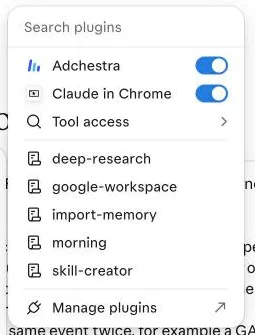
The same submenu has Tool access with two choices: Load tools when needed and Tools already loaded. The first is the default. It keeps chats shorter, because Claude only loads a tool's details when it needs them. Anthropic's page says that if you have 10 or more connectors active, the on-demand setting is the one to use.
Then ask something that can only be answered by the server. For a Google Ads server I use:
List my Google Ads campaigns by name. Read only.If Claude shows a tool call and real campaign names, the connector works. If you get a general essay about campaigns, Claude never called the server.
Decide what Claude may do without asking
A connector has many tools: small actions the server offers, like "get campaign performance". When Claude wants to use one, it can ask you first. Anthropic says to review each approval request carefully and click Always allow only for servers and tools you trust to run unsupervised.
You can also set this ahead of time, tool by tool:
- Open the connector from the Plugins page.
- Click the Permissions tab. The tools are split into Read-only tools and Write/delete tools.
- Click the choice on a tool's row to change it.
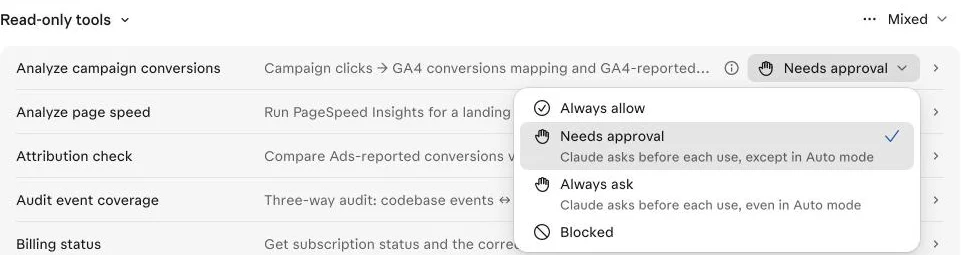
- Always allow. Claude uses the tool without asking.
- Needs approval. Claude asks before each use, except in Auto mode.
- Always ask. Claude asks before each use, even in Auto mode.
- Blocked. Claude cannot use the tool at all.
My rule: reading can be "Always allow". Anything that changes or deletes data stays on "Needs approval" or "Always ask". For a server that can touch ad spend, I would block the write tools until I need them. Whatever you choose, remember what a connector can do: it runs with the permissions of the account you signed in with.
The same thing in Claude Code
Claude Code is Anthropic's command line tool. It does not use the clicks above. Run this once in a terminal, with your own name and address:
claude mcp add --transport http NAME https://mcp.adchestra.com/mcpThen start Claude Code, type /mcp and follow the browser sign-in. Claude Code's documentation says the add command only saves the setting without checking it, so /mcp is also where you see whether it worked. Connectors you added on claude.ai also appear in Claude Code, but they rank last if the same server is defined twice.
When it does not work
These are the problems people post about most. Where a fix is confirmed, I give it. Where it is not, I say so and tell you what people did instead.
Connected, but Claude has no tools
This is the big one. The connector says Connected, you can see its tools in settings, and Claude acts as if it does not exist. Try these in order:
- Check the per-chat switch. The + menu, then Plugins. A connector that is connected but switched off for this chat looks exactly like a broken one.
- Start a new chat after you add or change a connector.
- Check the tool permissions. A tool set to Blocked will never be offered.
- Disconnect and reconnect. Anthropic's help page recommends it for authentication problems.
- Check the address. It must be the exact address the server documents, on port 443, reachable from the public internet.
If all of that is fine, it may not be you. In a long GitHub thread, users reported custom connectors that show their tools in Settings but never reach the model, after a Claude Desktop update at the end of June. The thread was closed by a bot without a fix. What people did: the tools worked in Claude Code and, for some, in Cowork, and one person got both connectors working again by running them through a local bridge in Claude Desktop's config file. That is a workaround, not an official fix.
Sign-in fails or never finishes
If you built the server, the likely cause is a redirect address that does not match. When you register your own OAuth client, Anthropic says to register https://claude.ai/api/mcp/auth_callback as the redirect URL. Claude Code is different: for a server that needs a fixed redirect, its documentation shows --callback-port and says to register http://localhost:PORT/callback.
If you only use the server, and the browser tab sits on "Trying to sign you back in", one reporter found that closing the tab by hand often still connected the connector. Check its status in Claude before you start over. Chrome as the default browser behaved better than Safari for that reporter. Again, no official fix.
"Connection expired" every day, or you must sign in again after a restart
Many people report this for custom connectors. In the main thread, the connector shows as connected after sign-in, then loses access after an app restart or a day. The thread never got an official fix. What people confirmed:
- Remove the connector and add it again. For some it held until the server restarted.
- In Claude Code, sign in again with
/mcp, orclaude mcp login NAMEin a terminal. - If you run the server, check that it hands out refresh tokens and answers an expired token with a proper 401. Without them, the client cannot renew the sign-in by itself.
Scheduled tasks lose the connector
A scheduled task runs without you, and several people found their custom connector missing in those runs while built-in connectors loaded normally. The newest thread, opened on 29 October, is still open with no Anthropic reply. People found that the tools appear after a human sends a follow-up message. An earlier thread was closed by Anthropic in May as fixed, yet later comments say it came back. My honest advice: for anything important, do not rely on a scheduled run having a custom connector. Check the first runs by hand.
Several accounts on one connector
I would love to tell you there is a switch for this. There is not. People who tried to move a Gmail connector to a second Google account got stuck on "you have some access already" in an open thread, and revoking access in the Google account did not help them. And as the form above shows, Claude will not let you add the same address twice in one organization. Until that changes, the plain route is to sign out of the connector and sign in with the other account, one account at a time. For a Google Ads server, a better route is to give the one Google account access to all the ad accounts you need.
A local server shows "Disconnected" or does not appear
Local servers are set up in Settings, then Developer, then Edit Config in Claude Desktop. That opens a file called claude_desktop_config.json, which on a Mac lives at ~/Library/Application Support/Claude/claude_desktop_config.json and on Windows at %APPDATA%\Claude\claude_desktop_config.json. Each server is an entry with a command and arguments. The official guide to local servers gives the fixes in this order:
- Quit Claude Desktop completely and open it again. Closing the window is not enough.
- Check the JSON. One missing comma and nothing loads.
- Use absolute paths, not relative ones.
- Run the same command by hand in a terminal and read the error.
- Read the logs. On a Mac they are in
~/Library/Logs/Claude. The filemcp.logcovers connections andmcp-server-NAME.logholds the server's own output.
Most "Disconnected" cases I read about were a missing program (Node, Python, pipx) or a version clash after an update. The log shows which one in the first lines.
I added it and now I want it gone
Go to the connector's page on the Plugins page, open the three-dot menu and choose Remove. Anthropic's page says to edit a connector the same way: remove it and add it again with the new details. To cut its access completely, also revoke it where you signed in, for Google in your Google account's security settings.
Using Claude Cowork?
Cowork is the part of Claude that takes a longer job, works through it in steps and hands you a finished file, such as a document or a spreadsheet. A connector you added once works there too. You do not add it again.
On my account there is no Cowork button any more. I describe the longer task in a normal chat and Claude runs it as a task, with a progress panel on the right. Anthropic says accounts with the older layout have a Cowork button below the message box.
Before you start, check that the connector is on for that task: click the plus button in the message box, open Plugins (or Connectors) and look at the switch. One limit: a server that runs on your own computer, such as any local server, works only in a Cowork session that runs on your computer, not in one that runs in the cloud.
For jobs that suit Cowork, with the prompts I ran on a real Google Ads account, see How to use Claude Cowork for Google Ads.
Frequently asked questions
What is the difference between a Claude connector and MCP?
There is none that matters to you. MCP is the standard, an MCP server is the program that follows it, and a connector is how that server shows up inside Claude. A custom connector is simply one you added yourself with its address.
Can I add a custom connector on the free plan?
Yes, but only one. Anthropic's help page says Free users are limited to one custom connector. Pro, Max and Ultra have no such limit listed.
Do custom connectors work in the Claude mobile app?
You add them on the web or in Claude Desktop. Because Claude connects from Anthropic's servers and not from your device, a connector you added there is usable in every client, including the mobile apps.
Is it safe to add a custom connector?
Only as safe as the server's owner. Claude's own form says to use connectors only from developers you trust. A connector acts with the access of the account you sign in with, so keep write tools on approval and revoke what you stop using.
Does this work in Claude Cowork?
Yes. A connector you add in Claude is also available in Cowork, so any connector you added needs no second setup. Check that its switch is on for the task. A server on your own computer only works in a Cowork session that runs on that computer.