 Adchestra
Claude does not know your search volumes
I asked Claude for 15 standing desk keywords with their monthly searches and cost per click. It answered in seconds with a tidy table. To its credit, it said the numbers were rough estimates from memory. Then I pulled the same keywords from Google's Keyword Planner.
| Keyword (United States) | Claude from memory | Keyword Planner |
|---|---|---|
| best standing desk | 49,000 a month | 9,900 a month |
| electric standing desk | 40,000 a month | 22,200 a month |
| standing desk converter(s) | 40,000 a month | 18,100 a month |
| adjustable standing desk | 33,000 a month | 12,100 a month |
| standing desk | $1.60 a click | $0.83 to $7.37 for the top of the page |
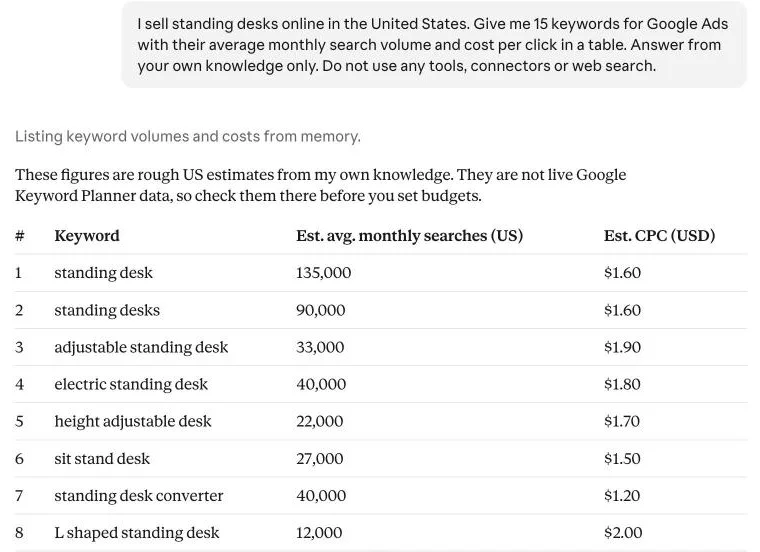
Claude is very good at the thinking part: who is buying, who is just reading, which words belong together. The numbers live in Google's Keyword Planner, the free research tool inside every Google Ads account. So the method is: get real Keyword Planner numbers into Claude, then let Claude sort.
I do the full job here for one example, a shop selling electric standing desks from $399 to $899 in the United States: ideas, buyers versus readers, ad groups, match types and negative keywords. It takes about 30 minutes, and every prompt is here in full.
Two ways to give Claude real numbers
| Way | Cost | Time | Pick it if |
|---|---|---|---|
| Download from Keyword Planner and upload the file | Free | 10 minutes | You research keywords a few times a year, or you want to pay nothing |
| Adchestra, which calls Keyword Planner for Claude | 10 requests free, then a 14-day trial, then $2.95 a month | 3 minutes to connect | You want to ask for new seeds in the chat and skip the downloads |
If you run your own connector on your own Google Cloud project, Adchestra Local included, use the download. Google's standard Explorer access, the level a new project gets for real accounts, does not include the Keyword Planner service. You need Basic access for that, and Basic requires brand verification. Downloading a file takes ten minutes. Waiting for Google takes longer.
Both ways meet again at step 4. From there the prompts are the same.
Way 1: Download keyword ideas from Keyword Planner
You need a Google Ads account. It does not need a running campaign to open Keyword Planner.
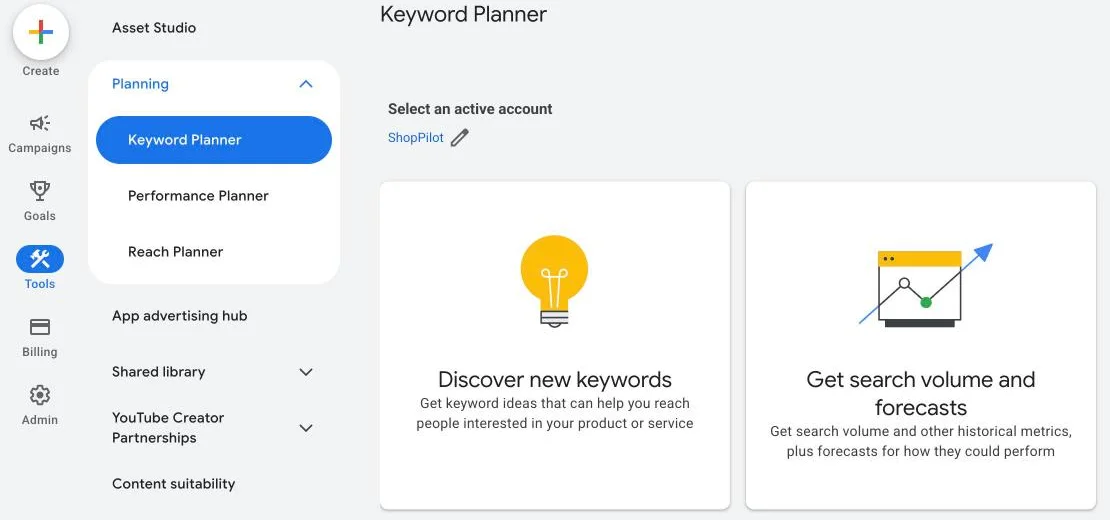
- In Google Ads, click Tools in the left menu, then Planning, then Keyword Planner. If you work from a manager account, Google first asks you to pick the account to plan in.
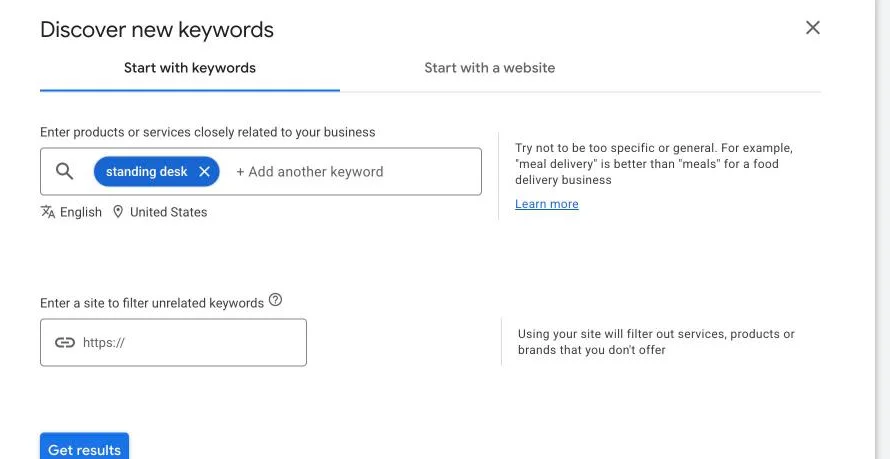
- Click Discover new keywords. Stay on the Start with keywords tab.
- Type your product the way a customer would say it and press Enter. I typed
standing desk. One to three seeds is plenty. - Check the language and location under the box. Mine defaulted to German and Switzerland, because that is where my account lives. Click each one and set the market you sell in. For my example: English and United States. Remove the old location with the small cross, then click Save.
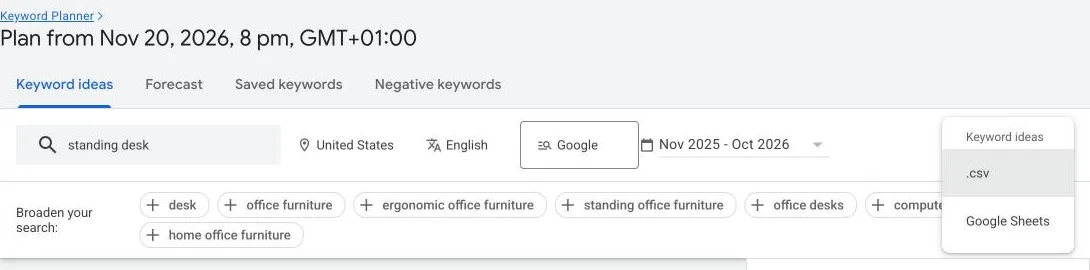
- Click Get results. I got 1,561 keyword ideas.
- Click the download arrow at the top right of the results, then .csv.
Two things about the file. The bids are in your account's currency; mine came out in Swiss francs. And volumes are a 12-month average for the location you chose, so a seasonal product looks flatter than it is.
Way 1: Upload the file and sort the searches
Start a new chat in Claude, click the plus button in the message box, choose Upload or add files and attach the CSV. Then send this, with your own product in place of mine:
Attached is my Keyword Planner export for the seed "[SEED]", [COUNTRY], [LANGUAGE], last 12 months. The bids are in [YOUR ACCOUNT CURRENCY]. I sell [WHAT YOU SELL, WITH PRICES] on my own website. I do not sell [PRODUCTS PEOPLE CONFUSE WITH YOURS]. Use only the numbers in the file. Do not use connectors or web search.
1. Sort the ideas into four groups: buyer searches (someone ready to buy a [PRODUCT] like mine), comparison searches (best, reviews, reddit), information searches (heights, benefits, how to, DIY) and not for me (other products, competitor brands, retailers). Show the top 15 buyer searches in a table with average monthly searches and the top-of-page bid range.
2. Tell me what share of the total volume is buyer searches.
My "do not sell" line was converters, frames only, treadmills, monitor arms and laptop stands. That line does more work than anything else in the prompt, because Keyword Planner mixes in every product that shares a word with yours.
Claude opened the file with its code tool and needed about three and a half minutes for 1,561 rows. If it says it cannot open the file, check that Create and edit files is on in Settings, Capabilities. Every volume and bid in its answer matched the export.
It also caught a trap. Keyword Planner gives close variants, small spelling and word-order changes of one search, identical numbers: "standing desk" and "standup desks" both show 135,000. Added up naively, buyer searches were 44.6% of the volume. Counted once per variant set, 39.9%. That is why every prompt here says to count variants once.
Now skip to step 4.
Way 2: Let Claude call Keyword Planner through Adchestra
Adchestra is the hosted connector I built with my co-founder. You add one address to Claude, sign in with Google, and Claude can call Keyword Planner itself. The setup clicks are in How to connect Claude to Google Ads. The address is:
https://mcp.adchestra.com/mcpThen send the research prompt. It asks for the ideas and the sorting in one go:
I sell [WHAT YOU SELL, WITH PRICES] on my own website, shipping in [COUNTRY] only. I do not sell [PRODUCTS PEOPLE CONFUSE WITH YOURS]. Use Adchestra's Keyword Planner tool to pull up to 200 keyword ideas for the seeds "[SEED 1]", "[SEED 2]" and "[SEED 3]", [COUNTRY], [LANGUAGE]. Read only. Do not change anything in my account.
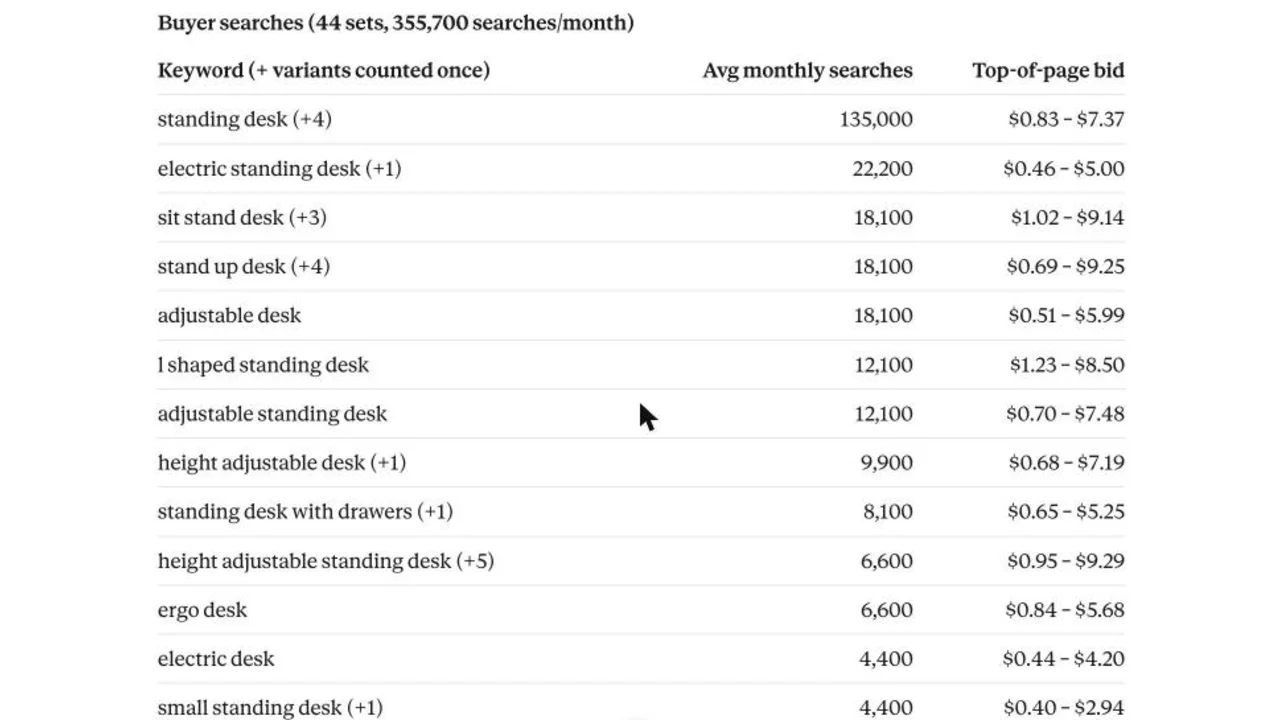
Then sort every idea into one of four groups: buyer searches (someone ready to buy a [PRODUCT] like mine), comparison searches (best, reviews, reddit, vs), information searches (heights, benefits, how to, DIY) and not for me (other products, competitor brands, retailers). Keyword Planner gives close variants identical numbers, so count each set of variants once. Show the buyer searches in a table with average monthly searches and the top-of-page bid range in dollars, then one line per other group with its total volume and three examples.
My seeds were "standing desk", "electric standing desk" and "sit stand desk". The Keyword Planner call took about 40 seconds and returned several thousand ideas. Claude kept the 200 with the most searches, merged them into 120 variant sets and sorted them. The whole answer took under three minutes.
If nothing happens
- Claude says it cannot use the connector. A connector can be switched off for a single chat. Claude shows a panel named Your connectors with a switch next to it. Turn it on and ask again.
- The lookup spins for more than two minutes. Click stop. Ask again with one seed and 50 ideas. A smaller request comes back faster, and you can add seeds one by one.
Check Claude's sorting with the bid column
Most guides skip this step, and it is the one that saves money. The top-of-page bid range is what advertisers have paid to appear above the search results, so it shows how much money they make from a search. In my own market this column separated buyers from readers more sharply than the volumes did. Same for desks:
| Search | Monthly searches | Top-of-page bid | What it tells me |
|---|---|---|---|
| electric standing desk | 22,200 | $0.46 to $5.00 | Buyer search. Advertisers pay real money for it. |
| l shaped standing desk | 12,100 | $1.23 to $8.50 | Buyer search. Advertisers pay real money for it. |
| standard desk height | 9,900 | $0.07 to $0.80 | Information search. Nobody makes money from it. |
| desk height | 5,400 | $0.07 to $1.09 | Information search. Nobody makes money from it. |
| ikea standing desk | 12,100 | $0.06 to $3.77 | Someone who has already chosen a store. Not for me. |
| best standing desk | 9,900 | $0.85 to $6.82 | Comparison search, but priced like a buyer search. People who type it buy soon. |
A "buyer" search that clears at a few cents is probably not a buyer search. A "comparison" search priced like the buyer searches deserves a second look. Two more checks:
- The biggest number is rarely your market. "standing desk" has 135,000 searches a month, including people who want a $90 desk, a converter or a picture for a slide. The searches that describe exactly what you sell are smaller, and they come first.
- Tiny searches are not worth an ad group. I skip anything under about 100 searches a month at the start.
Group the buyer searches and choose match types
An ad group is a set of keywords that share one ad and one landing page. If one ad and one page do not fit every keyword, split the group.
A match type decides how far Google may stretch a keyword. Exact match covers searches with the same meaning, phrase match searches that include its meaning, broad match anything related. Google says broad match needs Smart Bidding, which learns from conversions. A new campaign has none, so I start without broad.
In the same chat, send:
Good. Now plan the search campaign from the buyer searches only.
1. Group them into 4 to 6 ad groups by meaning, so one ad and one landing page fit every keyword in a group. For each ad group give the keywords, their combined monthly searches and the landing page it needs.
2. Choose a match type for every keyword: exact for the high-volume head terms, phrase for the rest. I start on [BIDDING STRATEGY] with a $[DAILY BUDGET] daily budget, so no broad match. Explain any exception in one line.
3. Write a negative keyword starter list for the whole campaign from the comparison, information and not-for-me groups: single words or short phrases, with a one-line reason each. Do not add words that a buyer would use, like [WORDS FROM YOUR BUYER SEARCHES].
Read only. Do not change anything in my account.
I used Maximize clicks, $40 a day, and "electric, adjustable or with drawers" as the buyer words. Claude came back with six ad groups:
| Ad group | Lead keywords | Searches a month | Landing page |
|---|---|---|---|
| Core standing desk | [standing desk], [sit stand desk], [stand up desk] | 188,900 | The main standing desk collection |
| Electric and motorized | [electric standing desk], "motorized standing desk", "electric sit stand desk" | 41,200 | The electric standing desk collection |
| Height adjustable | [adjustable desk], [adjustable standing desk], "height adjustable desk" | 54,900 | A page about the height range and memory presets |
| Sizes and shapes | [l shaped standing desk], "corner standing desk", "small standing desk" | 26,100 | A page with the L-shaped, corner and compact models |
| Home office and ergonomic | [ergo desk], "ergonomic standing desk", "standing desks for home office" | 24,600 | A home office or ergonomic setup page |
| Storage and finishes | "standing desk with drawers", "white standing desk", "wood standing desk" | 20,000 | Models with drawers, storage and finishes, only if you sell them |
Square brackets mean exact match and quotes mean phrase match. That is also how you type them into Google Ads.
One exception I had not thought of: Claude put short, vague searches such as "lift desk" and "adjustable height table" on exact match although they are small. On phrase match they would let in lift-top coffee tables.
It also warned that Maximize clicks has no bid ceiling by default, that bids here reach $17.42, and that "standing desk" alone could eat most of $40 a day. I would go further: with a small budget, skip the core group at first. Start with the electric group, which is exactly what I sell, set a maximum bid, and add "standing desk" once I know what a sale costs.
Build the negative keyword starter list
A negative keyword stops your ad from showing for searches that contain it. The third part of the prompt above asked for a starter list. Claude's list was long and mostly right. Here it is after my edits, ready to paste into a campaign's negative keywords:
reddit
review
reviews
vs
versus
[desk height]
[working desk height]
"standard desk height"
"regular desk height"
diy
"how to"
benefits
converter
converters
riser
risers
lap
"laptop stand"
"laptop tray"
"monitor stand"
"monitor arm"
printer
"keyboard tray"
kids
bed
treadmill
"desk frame"
"frame only"
ikea
amazon
costco
wayfair
"near me"
Add competitor brand names from your own idea list as well. In mine they were Uplift, Flexispot, Varidesk, Autonomous and a handful of others. Claude listed them for me.
What I changed, and why:
- I took "best" out. "best standing desk" bids like a buyer search, so I would rather watch it than block it on day one.
- "desk height" stays exact. Claude noticed that as a phrase negative it would block "electric desk height adjustable", a buyer. Good catch.
- Plurals need their own line. Negatives do not match close variants, so "converter" does not block "converters". Claude also said negatives miss misspellings. Google says they handle misspellings automatically. Plurals and synonyms are on you.
- No "free" or "cheap". "cheap standing desk" is still somebody buying a desk. I watch the search terms report for a week before blocking it.
This is a starter list. After a week or two, the real list comes from your search terms report: what people actually typed before they clicked.
Frequently asked questions
Can Claude do keyword research without Keyword Planner?
It can brainstorm keyword ideas and sort them by intent, and it does that well. It cannot know search volumes or bids. In my test it overstated most volumes, some by five times. Give it a Keyword Planner export or a connector that reads Keyword Planner, and tell it to use only those numbers.
Do I need to spend money in Google Ads to use Keyword Planner?
No. Keyword Planner is free inside any Google Ads account, and you can open it without a running campaign. You only need an account to sign in to.
Why can my own Google Ads connector not use Keyword Planner?
A self-hosted connector runs on your own Google Cloud project, which reaches real accounts with Explorer access, and Explorer does not include Keyword Planner. Apply for Basic access, which needs brand verification, or download the ideas and upload the file.
Which match type should I start with?
For a new campaign without conversion history, I use exact match for the few biggest searches and phrase match for the rest. Google says broad match should be paired with Smart Bidding, which needs conversions to learn from. Once the campaign records conversions, broad match on Smart Bidding is worth a test.
How exact are Keyword Planner's volumes?
They are rounded averages of the last 12 months for the location and language you chose. That is good enough to compare searches with each other and to see which ones matter. It is not a promise of traffic, and a seasonal product looks flatter than it is.