 Adchestra
A Google Ads audit is a checklist, and Claude can run it
Freelancers sell a Google Ads audit for $200 to $350 on Upwork. What they check is a list: are conversions counted once, is Search Partners off, do the keywords appear in the ads, are the negatives attached. Every item is a setting you can read yourself.
I ran my list on my own account with Claude. Within a minute it found that one keyword is spelled "optimisation" while every headline in that ad group says "optimization", and that two keywords in another ad group appear in none of its headlines. Dull, real, cheap to fix. That is what an audit finds.
This guide is my checklist in the order I run it: eight checks, the exact prompt for each, what a good answer looks like and what to do about a bad one. The audit takes about 30 minutes, and Claude changes nothing. A conversion action is the thing you count as a win. A search term is what a person typed. A negative keyword is a word you tell Google not to show your ads for.
Which way is right for you
| Way | Cost | What Claude can do | Pick it if |
|---|---|---|---|
| Download reports and upload them | Free | Read the files you give it. You fix things by hand. | You audit once or twice a year, or want to try it today |
| Adchestra | 10 requests free, then a 14-day trial, then $2.95 a month | Read everything live. Every change it proposes is a preview you approve. | You audit every month, or do not want to download five reports |
Four rules that make the audit trustworthy
- Read only. Every prompt says "change nothing". You decide what to fix.
- PASS, WARNING or FAIL, with a reason. Without it Claude writes a pleasant essay you cannot scan.
- Claude must say what it could not check. A confident guess is worse than none.
- Ignore Google's Optimization score. It rewards accepting recommendations, which mostly raise spend.
Route 1: download five reports and upload them
Skip this step if you use Adchestra. Set the date range to 90 days. On each table click Download above it and choose .csv (Google lists the formats).
- Campaigns: Campaigns, then Campaigns. Click Segment, then Network (with search partners), so the file shows what ran on Google Search, Search Partners and Display.
- Search terms: Campaigns, Insights and reports, Search terms.
- Keywords: Campaigns, Keywords, Search keywords.
- Ads: Campaigns, Ads & assets, Ads.
- Conversion actions: Goals, Conversions, Summary.
Two extras. The change history (the log of who changed what) is under Tools. Campaign settings are in no table, so open each campaign's Settings and screenshot Networks, Locations and Languages.
In a new chat click the plus button in the message box, choose Upload or add files and add everything. Put this line at the top of every prompt below:
Use only the attached files and screenshots, not any connected account. If a check needs data I did not attach, tell me which report to download.Route 2: let Claude read the account itself
Skip this step if you use files. Connect Adchestra once, in How to connect Claude to Google Ads: one address, https://mcp.adchestra.com/mcp, and you sign in with Google.
A connector can be off for one chat. In a new chat click the plus button in the message box, open Connectors (or Plugins) and switch Adchestra on. Then put this line at the top of every prompt below:
Audit my Google Ads account "YOUR ACCOUNT NAME". Read only: change nothing and do not prepare any change or preview.1. Check the conversion actions first
If Google counts the wrong thing, every report and every automatic bid is built on it.
Step 1 of the audit, can I trust the numbers? List every conversion action with its type (website tag, GA4 import, phone call), status, category, primary or secondary, counting method and value setting. Tell me which actions Smart Bidding would optimise on, whether two probably count the same event twice, and whether any is hidden, removed or not recording. Give each PASS, WARNING or FAIL in one line. Say what you cannot check from inside the account, such as whether the tag really fires.A good answer: one or two primary actions, each the event that makes you money, such as a purchase. Google explains why in primary and secondary conversion actions: only primary actions feed the Conversions column and automatic bidding. My purchase action uses the real order total as its value and has enhanced conversions on, which sends hashed customer details so Google can match more sales to ads.
A bad answer, and the fix:
- Two actions count the same sale (a website tag and a GA4 import). Open Goals, Conversions, Summary, click one and set it to Secondary.
- A "purchase" that fires on a page load. Remove it.
- A flat value of 1 on a purchase. Use the real order total, or Smart Bidding thinks every order is equal.
- Hidden or removed actions still marked primary. Claude flagged some in my account. Harmless now, confusing later.
2. Check the settings that quietly waste money
Google sets these switches in its own favour. I check every campaign.
| Setting | What I want | Why |
|---|---|---|
| Search Partners | Off | Google includes them by default. They are other sites and search engines, with worse traffic and little visibility. |
| Display | Off | A Search campaign that also runs on Display is two campaigns sharing one budget. |
| Location option | Presence | Google's default is Presence or interest, which also reaches people outside your area who show interest in it. I want only people who are there. |
| Languages | The language of the ads | An English ad shown to a German searcher wastes the click. |
| Auto-applied recommendations | All off | Google applies them without asking, and most raise spend. |
| AI Max, automatically created assets, final URL expansion, dynamic search ads | All off | Each lets Google rewrite my ads or pick the page. That breaks the match between keyword, ad and page. |
Step 2 of the audit: settings that waste money. For every campaign show in one table: is Search Partners on, is Display on, the location option (Presence or Presence or interest), targeted and excluded locations, languages, which auto-applied recommendation types are on (check the account's auto-apply settings with a query, not only the Recommendations tab), ad rotation, ad schedule and device bid adjustments, and whether AI Max, automatically created assets, final URL expansion or dynamic search ads are on. Give each row PASS or FAIL, and for each FAIL say what to change and where to click. If a setting cannot be read, say so instead of guessing.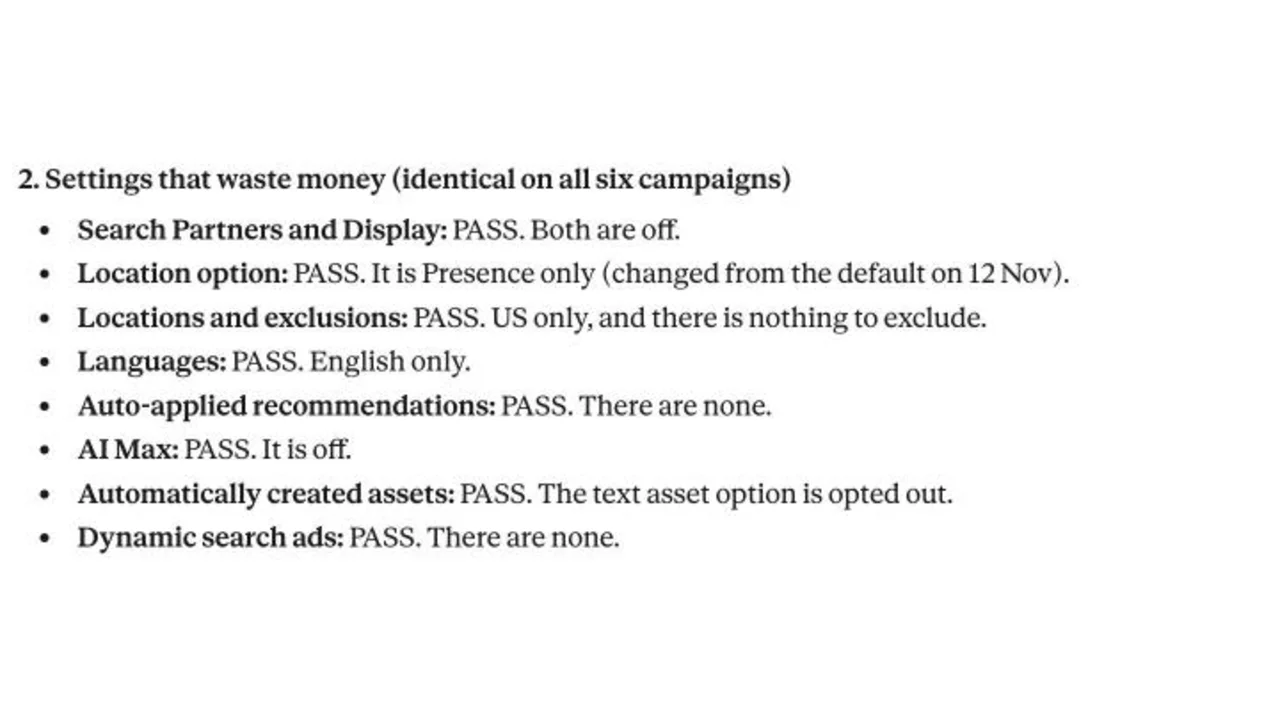
A good answer is a table of PASS rows. A bad answer has a FAIL, and the fix is a click path. Search Partners: open the campaign, then Settings, Networks, and untick Include Google search partners. Recommendations: Recommendations, Auto-apply, untick each type and save, as Google describes.
3. Check the bidding strategy against the data
Smart Bidding means Google sets your bids automatically, learning from your conversions. It cannot learn from nothing.
Step 3 of the audit: bidding strategy against data. For each campaign show the bidding strategy and the number of conversions in the last 30 days and the last 90 days. Smart Bidding with a target needs around 30 conversions in 30 days to learn from. Say whether each strategy suits the data.A good answer follows the ladder I use:
- No history: Maximize conversions with no target, and a daily budget of 3 to 5 times a conversion's cost.
- About 30 conversions in 30 days: add a target CPA, the cost you accept per conversion. Google uses 30 in 30 days as its benchmark.
- 50 or more, with order values tracked: Maximize conversion value with a target ROAS, the return you want per dollar. Google's guidance gives 15 in 30 days as the minimum.
A bad answer: a tight target on a handful of conversions, or manual bidding, which means setting and maintaining every bid by hand. Fix it in Settings, Bidding, then leave it alone for 14 days. Changing it often resets the learning.
4. Check the structure: campaigns, ad groups, keywords
My rule is one clear keyword theme per ad group, so the search, the ad and the page say the same thing. A match type says how loosely a keyword may match a search: exact is tight, phrase looser, broad loosest.
Step 4 of the audit: structure. For each campaign show the ad groups, keywords per ad group and match types. Flag ad groups with more than 10 keywords or mixed themes, the same keyword in several match types, ad groups with no ad or keyword, the same keyword in two campaigns, and any keyword that appears in none of the ad group's headlines. Give each campaign PASS, WARNING or FAIL in one line.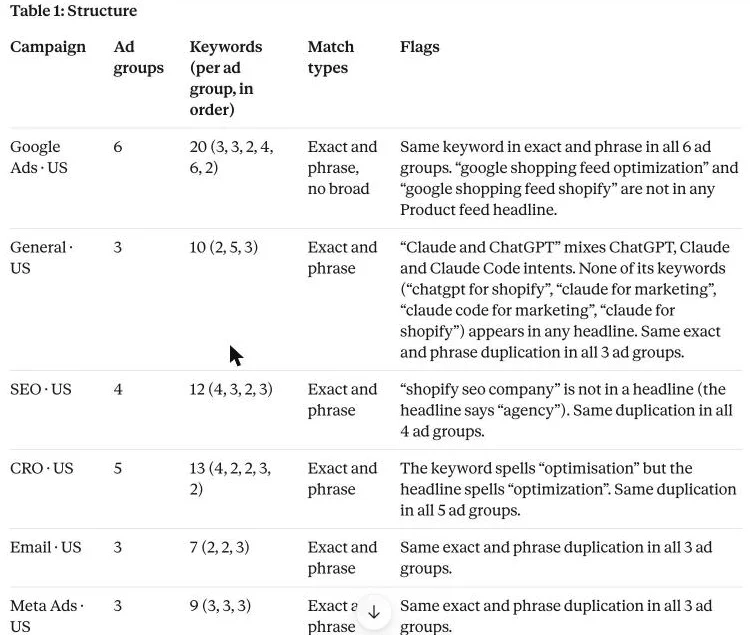
A good answer: a few keywords per ad group (mine have two to six), one theme each, and every keyword written out in a headline.
- Ten keywords on four themes in one ad group. Split it. In Keywords, tick them, click Edit, Change ad group, and write a new ad per theme.
- A keyword in no headline. Add a headline containing the whole keyword, or remove the keyword. Google counts a keyword for ad strength only when it sits entirely within one headline. This is how I found my "optimisation" mismatch.
- The same keyword in two campaigns. They compete. Keep it in one.
5. Check search terms and negatives
Most wasted money hides here, so it has its own guide: How to find negative keywords with Claude. The audit prompt:
Step 5 of the audit: search terms and negatives. Pull the search terms for the last 90 days. Read the existing negatives and shared negative lists, and tell me how many negatives each list holds and which campaigns it is attached to. List the 10 search terms most clearly wrong for what I sell, with the negative to add (match type and level). Do not suggest negatives that block buyers.A good answer: a shared list of universal junk (jobs, free, diy) attached to every campaign. Mine holds 70 negatives and is attached to all six campaigns. A bad answer: no list, or a list attached to nothing. An unattached list blocks nothing. Attach it under Tools, Shared library, Exclusion lists: tick the list and click Apply to campaigns.
6. Check the ads and assets
A responsive search ad gives Google up to 15 headlines and 4 descriptions to mix. An asset is an extra shown with the ad: sitelinks (extra links), callouts (short claims), structured snippets (a labelled list).
Step 6 of the audit: ads and assets. For each ad group show the enabled ads, number of headlines and descriptions, pinned headlines and positions, and ad strength. For each campaign show the number of sitelinks, callouts and structured snippets. Flag ad groups with fewer than 2 ads, ads with fewer than 15 headlines or 4 descriptions, headlines identical across all ad groups, pins that leave Google no room to test, and fewer than 4 sitelinks, 4 callouts or 1 snippet per campaign. Give each campaign PASS, WARNING or FAIL in one line.- Pin only the keyword variants, to headline 1. Google says pinning is not recommended for most advertisers. I pin the keyword variants so the ad repeats the search, and leave the rest free.
- 4 or more sitelinks and callouts, one snippet. Google needs two sitelinks to show any.
- Headlines specific to the ad group. The same 12 headlines in every ad make copies.
A bad answer: one ad per ad group and the same headlines everywhere. Claude flagged both in my account. Write a second ad with three headlines naming what that ad group sells: Ads & assets, Ads, the blue plus button, Responsive search ad.
7. Check the landing pages
Step 7 of the audit: landing pages. Open each distinct final URL my ads use. For each, check that it loads, that its main heading matches the keyword theme of the ad groups sending people there, that one clear action is visible without scrolling, and how fast it is on mobile. Show one table with a verdict per URL.The landing page is where the click arrives. A good answer: every URL loads, the heading says what the ad said, there is one clear button and the page is fast on a phone. I want a short form and a load time under 2 seconds. A bad answer: a pricing keyword landing on the home page, or one page serving six unrelated ad groups. Give each theme its own page, or point the final URL at the section that answers it. With files, Claude cannot open your pages: run Google's free PageSpeed Insights yourself and paste the result.
8. Turn the findings into a priority list
Do not fix everything. Fix what protects the most money or data quality, cheapest first.
Using everything you found in this chat, give me a priority list of at most 10 fixes, ordered by how much money or data quality each protects, with effort as low, medium or high. For each fix say exactly where to click in Google Ads. Leave out anything you could not verify. Then stop and wait for me.My order never changes: conversion tracking, wasteful settings, negatives, structure, ads. A wrong conversion action makes every later fix a guess.
The whole audit in one prompt
Once you have seen the eight answers, run everything at once. With files, add the files line at the top. It takes a few minutes, and landing pages are the slowest part.
Run a full audit of my Google Ads account "YOUR ACCOUNT NAME". Read only: change nothing and do not prepare any change or preview. Work through these steps in order, keep each short, and give every check PASS, WARNING or FAIL with one line saying why.

1. Can I trust the numbers? List the conversion actions: type, status, primary or secondary, counting method. Flag duplicates, hidden or removed actions still marked primary, and actions not recording. Say what you cannot check from inside the account, such as whether the website tag really fires.
2. Settings that waste money, per campaign: Search Partners, Display, location option, locations and exclusions, languages, auto-applied recommendations, AI Max, automatically created assets, dynamic search ads.
3. Bidding strategy against data: for each campaign the strategy and the conversions in the last 30 and 90 days. Smart Bidding with a target needs around 30 in 30 days. Does the strategy suit the data?
4. Structure: ad groups, keywords per ad group, match types. Flag mixed themes, the same keyword in several match types, overlapping campaigns and keywords that appear in no headline.
5. Search terms and negatives: the last 90 days of search terms against the existing negatives and shared lists. List the 10 search terms most clearly wrong for what I sell, with the negative to add (match type and level). Never suggest negatives that block buyers.
6. Ads and assets: ads per ad group, headline and description counts, pinning, ad strength, sitelinks, callouts and structured snippets per campaign.
7. Landing pages: open each distinct final URL. Does it load, match the keyword theme, show one clear action above the fold, and load fast on mobile?
8. The change history for the last 30 days: does anything explain a problem above?

Finish with a priority list of at most 10 fixes, ordered by how much money or data quality each protects, with effort as low, medium or high and exactly where to click in Google Ads. Then stop and wait for me.
What Claude cannot check from inside the account
The big one: whether the conversion tag on your website really fires, once, with the click ID attached. Google Ads shows the action as set up. It cannot show that your checkout runs the code.
My example is Shopify. Custom pixels there run in an isolated frame that cannot read the storefront's cookies, so the ad click ID is invisible to the tag unless you read it through Shopify's browser API. The failure is silent: the conversion records, attributes to no campaign, and the account looks healthy.
To check, place a test order of a small, non-zero value (a 90% discount, not 100%, because a zero order cannot tell "value arrived" from "value broke"). A few hours later open Goals, Conversions, Summary and confirm the conversion arrived with the right value. Also outside Claude's view: consent settings, why past changes were made, and your margins, which you should put in the prompt.
Frequently asked questions
Can Claude replace a paid Google Ads audit?
For the checklist part, yes: settings, structure, tracking, ads and negatives. It does not know your margins or why a past change was made. You supply that and decide the fixes.
Will Claude change my account during the audit?
Not if you say read only, and never with uploaded files. With a connector that can change Google Ads, such as Adchestra, every change is a preview applied only after you approve it.
How often should I audit?
Run the whole prompt monthly, and after any big change to the account or the website. Run step 5 weekly for the first two months.