 Adchestra
Partly. Here is the line.
Search YouTube for "automate Google Ads with AI" and you get videos with hundreds of thousands of views. One of them has about 281,000. The promise is that you connect an AI and it runs everything. About 1,500 people a month type "google ads ai" and similar phrases into Google, and many of them are hoping for exactly that.
I run my own Google Ads. I built and ran a Search campaign through the Google Ads API with an AI assistant, so this is not a guess. The honest answer is partly. AI is very good at reading, analysing and drafting. It is dangerous when it changes money without you watching. And there are jobs it cannot do at all.
This guide draws that line job by job, shows the setup I use so a mistake cannot cost me much, and then shows a real change preview, the screen where the AI says "here is what I would do" and waits for you. It takes about 15 minutes to read.
An AI assistant here means Claude or ChatGPT connected to your account through a connector, a plug that lets it read and change your Google Ads. A preview is the AI showing a change before it is made. A dry run is a rehearsal of the change that touches nothing. The change history is Google's own log of who changed what.
The line, job by job
| Job | Group | Can AI do it? | Why |
|---|---|---|---|
| Read the account and explain it in plain words | A | Yes, well | It reads far faster than I do and it does not get bored. Reading changes nothing, so a mistake costs you nothing. |
| Review search terms and say which are junk | A | Yes, well | It is judgement about intent, which is what these models are good at. You still decide. |
| Propose negative keywords | A | Yes, well | It proposes, you approve. Nothing is added until you say so. |
| Keyword research with Keyword Planner data | A | Yes, well | It reads real volumes and groups them. Nothing in your account changes. |
| Draft ads and assets (headlines, descriptions, sitelinks, callouts) | A | Yes, well | Drafting is cheap to check. I read every line before it goes anywhere. |
| Build a campaign from a brief, created paused | A | Yes, if it is created paused | A paused campaign spends nothing. Everything is checked before you switch it on. |
| Audit settings (networks, locations, conversion actions) | A | Yes, well | An audit is a checklist of settings. Reading a setting is easy for AI. |
| Write the weekly summary | A | Yes, well | Turning numbers into sentences is the job it is best at. |
| Change a budget | B | Only while you watch | A wrong number spends real money today. A wrong zero is a 10 times mistake. |
| Change bids or the bidding strategy | B | Only while you watch | Google needs time to learn after a change. A bad change costs days, not minutes. |
| Enable a campaign | B | Only while you watch | This is the moment spending starts. I press this one myself. |
| Any change where a wrong zero is expensive | B | Only while you watch | AI can be wrong in a calm, confident voice. You read the preview and check the numbers. |
| Know your margins and which leads became customers | C | No, unless you tell it | That data lives in your shop or your sales notes, not in Google Ads. It cannot guess it. |
| See whether your website tag fires | C | No | It sees what Google received, not what your page did. Checking the page needs a person or a tag tool. |
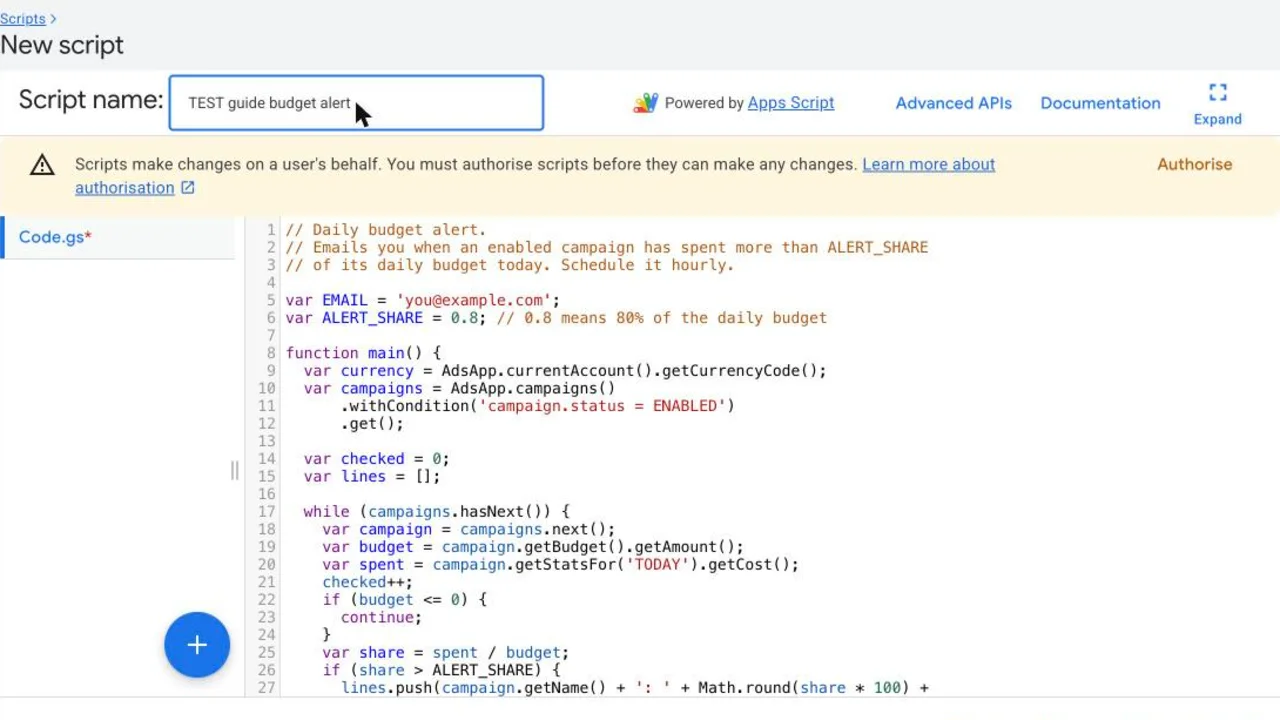
| Act on its own without being asked | C | No | An assistant does nothing until you ask. For a check that must run at 3 a.m. you need a schedule, as in Google Ads scripts or AI. |
| Take responsibility | C | No | Google bills you. If the AI is wrong, the cost is yours. |
Group A: AI does this well today
Everything here either changes nothing or changes something you approve line by line.
Reading and explaining. Once Claude can see your account, "why did cost per click go up this week?" becomes a real answer instead of an essay. Connect it first in How to connect Claude to Google Ads.
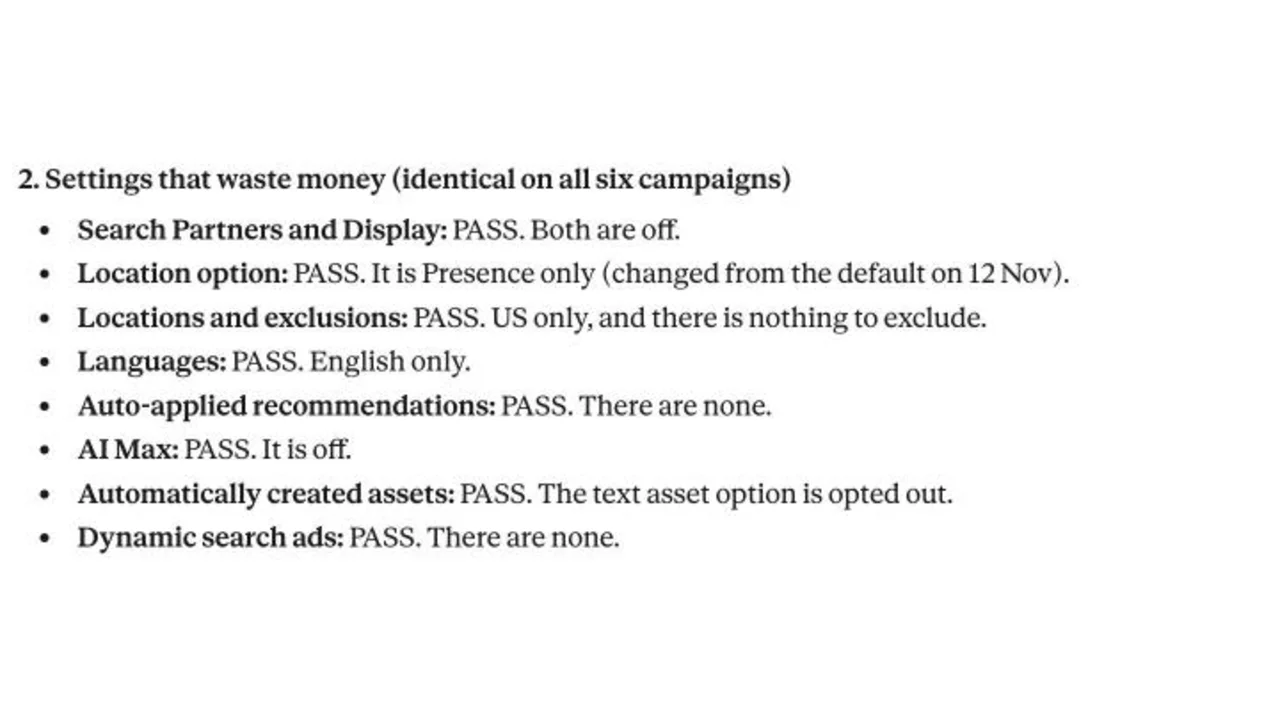
Audits. A Google Ads audit is a list of settings. In my own account Claude found a keyword spelled "optimisation" while every headline in that ad group said "optimization". Dull, real and cheap to fix. My eight checks, with the prompts, are in How to audit a Google Ads account with Claude.
Search terms and negatives. A search term is what a person typed. A negative keyword is a word you tell Google never to show your ad for. The AI is very good at spotting that "free birth chart" is not someone who wants to buy. But I do not let it add negatives alone, and that matters, so here is my routine. It pulls the search terms, drops terms with too few impressions to mean anything (my default is 100), checks the first Google results page for each doubtful term to see what people want, and then shows me a table: BAD, KEEP or UNCERTAIN. I answer with rank numbers. Only then does anything get added. UNCERTAIN terms need a yes each. A term can have zero conversions simply because it had little traffic, and a negative on a buyer's term quietly kills sales. The full routine is in How to find negative keywords with Claude. One agency owner wrote that this loop "has basically replaced my weekly trip into the Ads UI".
Keyword research and drafting. The AI reads Keyword Planner volumes and groups keywords by intent, as in How to do keyword research with Claude. It writes fifteen headlines faster than I write three. I keep a voice file for my brand and tell it to follow the file, because left alone it sounds like every other ad.
Building a paused campaign. This is where I have real mileage. My Search campaign lives in code: one config file holds the campaign, keyword, negatives and ads, and a script builds it. The script creates everything paused, and a second script reads the live campaign back so I can compare it with the file. It takes about 19 small scripts. You do not need that: a connector gives you the same shape without the code. A second rule from this build: after every change I verify, which means I read the live state back instead of trusting "success".
Group B: AI does this only while you watch
Anything that changes money belongs here: budgets, bids, switching a campaign on, changing the bidding strategy. The AI can do each of them. The question is who checks.
The people in the forums ask the same thing. On Hacker News someone asked whether the agent proposes changes first or executes within predefined limits. That is the right question, and my answer is: it proposes, always.
The reason is that the cost of being wrong is lopsided. A good headline is worth a little. A budget wrong by a factor of ten costs a bad day. Google also needs time to settle after you touch a bidding strategy, so I do not change one for 14 days after a change. An AI does not know that rule unless you tell it, and even then you want to see it say so.
So group B means: the AI prepares, you read, you approve, and afterwards you check what really happened. The next section is that routine.
Group C: AI cannot do this
- Know your margins. Google Ads knows what a click cost. It does not know what a sale left you after shipping, returns and tax. If a campaign "works" in Google's numbers but loses money in yours, the AI cannot see it unless you tell it.
- Know which leads became customers. Google counts the conversions you set up. Which of those people paid is in your own records.
- See whether your tag fires. It can read the conversion numbers Google received. If they look odd, it can tell you to check the tag. It cannot stand on your checkout page.
- Act on its own. It waits for your message. People report that scheduled Claude tasks cannot reach Google APIs, so I would not trust a nightly job to it yet. For rules that must run every day, a script is the right tool.
- Take responsibility. It will say sorry nicely. The bill is yours.
Set it up so a mistake cannot hurt
These are the rules I use. None of them needs a developer.
- Read only first. For the first week, only ask questions. Start every prompt with "Read only. Change nothing and do not prepare any change." You learn how it thinks before it can touch anything.
- One change at a time. Never "fix my account". Ask for one change, look at the preview, approve it, check it, then ask for the next. Mixed changes hide the one that broke something.
- Always ask for a preview. Say "show me the preview and wait for my approval". Read every line of it.
- Create things paused. New campaigns and ads should be created paused. Enabling is a separate step that you do after you have read them in Google Ads.
- Name a daily budget cap. Put the number in your prompt ("daily budget $5, never more") and check that number in the preview. A budget is the only field where the wrong number spends money the same day.
- Keep write tools on ask. In Claude, a connector has a list of tools, and for each one you choose how it asks. I keep the tools that change things on "Allow once", so Claude must ask before each call. I never choose always allow for a write.
- Check the change history afterwards. In Google Ads, open Campaigns in the left menu, then Change history. It lists every change, who made it and when. Older tutorials say Tools, then Change history, and in my account the Tools menu no longer has it, so look under Campaigns. This is your proof of what really happened, because it is Google's record and not the AI's.
Rule 7 is not a formality. After my demo below I opened the change history and looked for the test campaign. It was not there, because nothing had been applied.
See what "AI with you watching" looks like
Here is a real example in my own ShopPilot account. I asked for something harmless: a new Search campaign named "TEST guide campaign" with a $5 daily budget. I used two routes.
Route 1: through Adchestra's tools
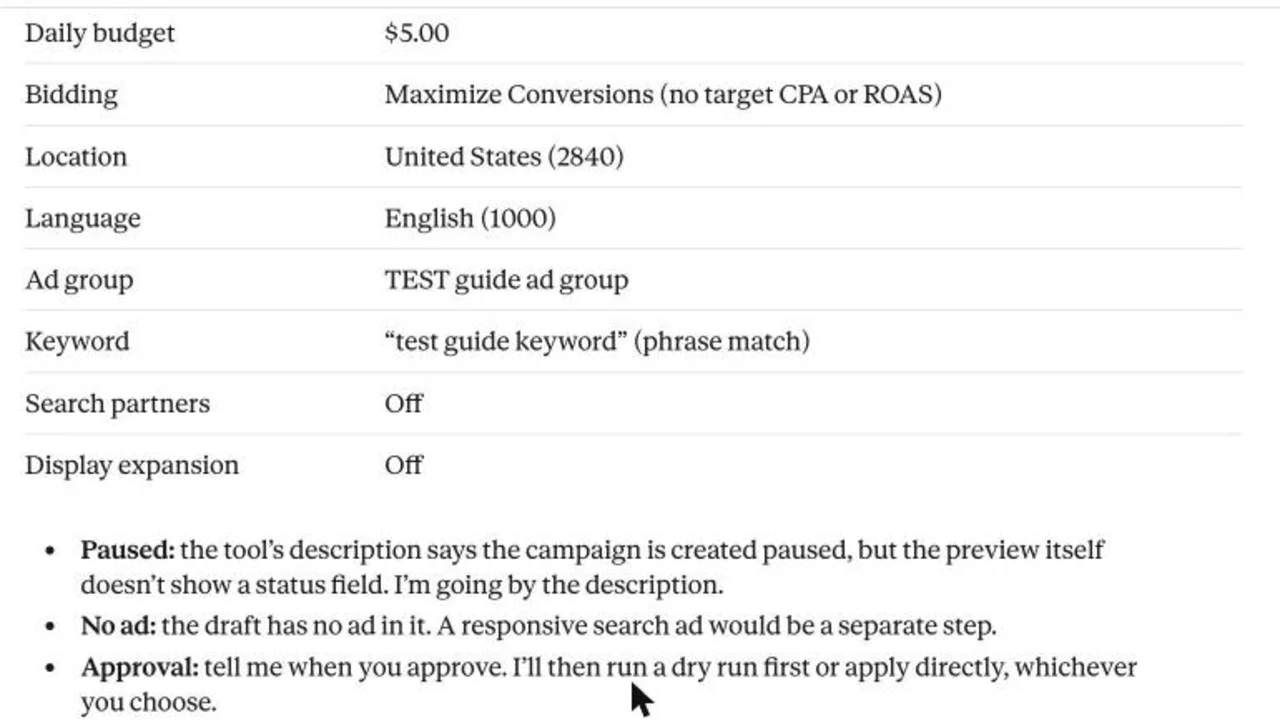
I called the draft campaign tool with the name, the $5 budget, Maximize Conversions, United States and English, one ad group and one phrase match keyword. It returned a preview and created nothing. The preview listed the campaign name, Search as the type, the $5 budget, the bidding strategy, the location and language, the ad group, the keyword with its match type, and Search partners and Display expansion both off. It also carried a plan ID and the status PENDING_CONFIRMATION, which means "waiting for you".
Then I ran the confirm and apply tool with the dry run switched on. It answered DRY_RUN_SUCCESS and said "Dry run completed, no changes were made to your Google Ads account". Adchestra also refuses a real apply until a plan has had one dry run, and I never ran the real one.
Route 2: from Claude
In claude.ai I clicked the plus button in the message box, opened Plugins (some accounts call it Connectors) and checked that Adchestra was switched on. Then I sent one prompt. Change the account name and the numbers, keep the rules at the end:
Use the Adchestra connector only, not the browser. In my Google Ads account "YOUR ACCOUNT NAME", prepare a new Search campaign named "TEST guide campaign": daily budget $5, Maximize Conversions, United States, English, one ad group named "TEST guide ad group" with one phrase match keyword "test guide keyword". It must be created paused. Show me the preview and wait for my approval. Do not apply anything, do not enable anything, and do not run a dry run until I say so.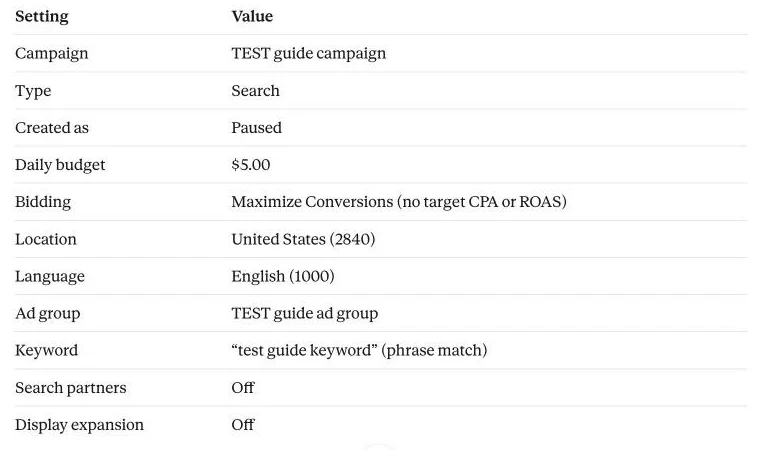
Claude called the draft tool and then did what I asked: it showed the table and waited. Under the table it added three notes I liked. It said the tool describes the campaign as created paused, but the preview itself has no status field, so it was going by the description. It said the draft contains no ad, because an ad is a separate step. And it said that, on my approval, it would either run a dry run first or apply directly, whichever I chose.
The first note is the whole lesson. A preview is not proof. "Created paused" is a promise until you open Google Ads and look. That is why rule 7 exists. I did not approve, I deleted the chat, and I opened the change history to confirm.
What I confirmed there: no entry for the test campaign, and the most recent change was dated before my test. Nothing was created, nothing was enabled.
What it costs in time compared with doing it by hand
For the negative keyword routine above, the AI takes about 3 to 5 minutes, because it checks Google for each doubtful term. My part is about 30 seconds of answering its questions and a minute reading the table. By hand, the same job is scrolling the search terms table and opening a Google search for each doubtful term, and that is where the time goes.
Drafting is quicker too, but I still read everything, and reading does not shrink.
Setting up is the other cost. Hosted Adchestra takes about three minutes. The self-hosted version takes about an hour, plus a Google Cloud project, as the connect guide explains. My code scripts cost far more. Where the job is the same check every day, a script is still the cheaper answer, as Google Ads scripts or AI shows. And the existing walkthrough for a whole build is Google Ads with Claude.
Where the popular videos oversell
- "Automate everything". Most of what they automate is group A: reading, reports, drafts. That is real and useful. It is not "AI runs your account".
- The earnings in the title. A number in a title tells you about one account and nothing about yours.
- "It built my campaign in minutes". True, and building is the easy part. The offer, the keywords and the tracking are yours.
- Quiet about mistakes. The more honest titles say it out loud, such as "Don't Automate Everything ($10k Wasted)" and "Do NOT Let AI Manage Your Google Ads". I agree with the second half of both: use AI, but not unwatched.
- Not every tool can do what it says. A person on Google's forum asked whether companies claiming a connector can create campaigns, ad groups, ads and keywords are selling something that cannot be done. It can be done, but Google's own free server cannot do all of it, so check what write tools a connector really has.
Google's own AI inside Google Ads
This is a different thing. It is Google's AI acting inside your account.
Performance Max is a campaign type where Google decides where your ads run across its inventory, from one campaign. AI Max for Search is an option for Search campaigns that lets Google broaden what your ads match. Auto-applied recommendations let Google change your account by itself when you opt in, and Google says you can turn them off at any time.
My opinion: I run Search campaigns only. I keep auto-apply off, and I check that it stays off, because I want every change in my account to be one I read first. That is the same rule as for any AI, just applied to Google's. In Google Ads, open Recommendations under Campaigns, then Auto-apply settings, and look at what is ticked.
Frequently asked questions
Can AI run my Google Ads for me?
Not on its own. It can read, analyse, draft and prepare changes, and it does those well. It should not change money without you reading the preview first, and it cannot know your margins or run on its own schedule.
Is it safe to let Claude change my campaigns?
It is safe if you set it up so each change is a preview you approve, new campaigns are created paused, and you check the change history afterwards. Do not give it permission to make changes without asking.
What should I let AI do first?
Start with reading: an audit or a search terms review. Neither changes anything. Once you trust how it thinks, let it propose negative keywords and draft ads, and approve them one by one.
Should I switch on Google's auto-apply recommendations?
I do not. They let Google change your account without you reading the change. If you want to use them, read what each one does in Google's help first.
Do I need Adchestra for this?
No. You can download reports and upload them to Claude for reading and drafting, and the free self-hosted Adchestra Local covers the rest if you do not mind an hour of setup.