 Adchestra
Claude is fast at this, and fast at getting it wrong
I asked Claude to go through a year of search terms in my Google Ads account. In a few minutes it found my ads showing for "synastry reading" (a reading for two people, which I do not sell), "horoscope by date of birth" (people who want a free daily horoscope) and "aitdk seo extension" (a free Chrome extension). All three deserve to be blocked.
In the same answer it suggested blocking find my, which would also block "find my birth chart reading". That is a buyer. Claude is great at finding junk, and you still have to read every suggestion.
A search term is what a person actually typed before your ad appeared. A negative keyword is a word or phrase you tell Google not to show your ads for. This guide gives you the rules I make Claude follow, the full prompts, and the exact clicks to add the negatives. It takes about 20 minutes the first time.
Which way is right for you
| Way | Cost | What Claude can do | Pick it if |
|---|---|---|---|
| Upload the search terms report | Free | Read the file and check each term on the web. You add the negatives by hand. | You do this once a month, or you want to try it today |
| Adchestra | 10 requests free, then $2.95 a month | Read your search terms, existing negatives and keywords itself, then add the negatives you approve after showing a preview. | You do this every week and you are tired of downloading files |
Both use the same rules. The rules matter more than the tool.
The four rules I make Claude follow
Ask Claude "which search terms should I exclude?" with no rules and you get a confident list that blocks anything without a sale. That is how you kill your best traffic.
- A traffic threshold first. A term with 3 impressions and no conversions tells you nothing. That is noise. I only judge a term on its numbers once it has 100 impressions. Below 50 is dangerous.
- Cost or conversion rate only above the threshold. Above it, flag terms with high cost or a conversion rate well below the campaign's average. Below it, never flag a term for having no conversions. Flag it only when the intent is plainly wrong.
- A Google check for every flagged term. Search the term and look at the first page. Job listings mean job seekers. Tutorials mean people who want to do it themselves. Free tools mean people who will not pay. Wikipedia means people who want information. Businesses selling what you sell mean buyers: keep. A mix means you decide.
- Human approval for every negative. A wrong negative can be removed, but until you notice it, it quietly blocks buyers.
Rule 1 surprises people with small accounts. If no term in your report reaches 100 impressions, that is fine. It means every decision is made on intent, which is exactly right for a small account.
Download the search terms report
- In Google Ads, click Campaigns in the left menu.
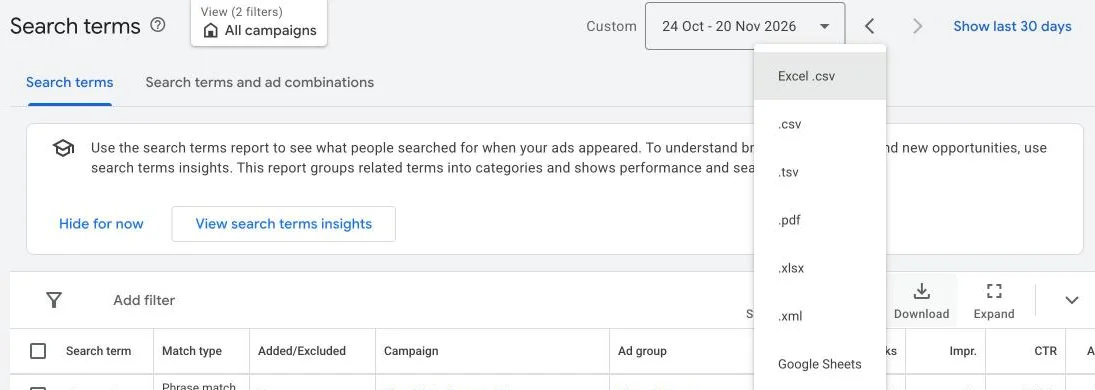
- Open Insights and reports, then click Search terms.
- Set the date range at the top right. Use at least 30 days, because less than 14 is too noisy. A small account needs 90 days or a year.
- Click Download above the table and choose .csv.
Google leaves out search terms that too few people used, for privacy. You cannot exclude what you cannot see, which is why I also use a starter list (at the end of this guide).
Upload the file to Claude and send the prompt
Start a new chat. Click the plus button in the message box, choose Upload or add files, pick the CSV and paste the prompt below. Web search must be on, because rule 3 needs it.
This is the exact prompt I used. Replace the "What I sell" paragraph with your product and price, and rule 5 with the words your buyers use. Those two edits make the answer good.
This file is my Google Ads search terms report for the last 12 months. Use only this file, not any connected account. Find negative keyword candidates.

What I sell: Novilunar, a personal birth chart reading, written for one person from their birth date, time and place. One-off purchase, $29.95. No live readings, no app, no free calculator. Some rows come from campaigns for ShopPilot, an AI marketing coworker for online stores, sold as a monthly subscription.

Rules:
1. Terms with 100 or more impressions have enough data to judge on cost and conversion rate. Terms under 100 impressions do not. Never flag those for having no conversions. Flag them only when the intent is clearly wrong for what I sell.
2. For every flagged term, search Google for it and look at the first page. Job listings, tutorials, courses, free tools, apps and definitions mean the searcher does not want to buy. Pages selling what I sell mean keep. A mix means uncertain.
3. Give each flagged term a verdict, BAD, UNCERTAIN or KEEP, with one line saying why.
4. For each BAD term, suggest the shortest word or phrase that blocks the bad intent without blocking buyers, its match type (broad, phrase or exact), and whether it belongs on the campaign or in a shared list. A shared list is only for intent that is wrong for every campaign, such as jobs.
5. Never suggest excluding words my buyers use: reading, report, book, personalized, best, accurate, detailed, in depth.

Show one table sorted by impressions: Term | Campaign | Impressions | Verdict | Why | Negative to add | Match type | Where | Cost. Then give me the BAD negatives as a plain list grouped by campaign, ready to paste into Google Ads, with phrase match in "quotes" and exact match in [brackets].
Claude ran about 50 web searches and took a few minutes. It opened by checking impressions and said it would judge the low-volume terms on intent only. Rule 1 doing its job.
The full table is wide. For just the junk, I asked for a short version:
Thanks. Now show only the BAD terms in one short table with four columns: Search term | Impressions | Why it is irrelevant | Negative to add. Keep each reason under eight words. No other text.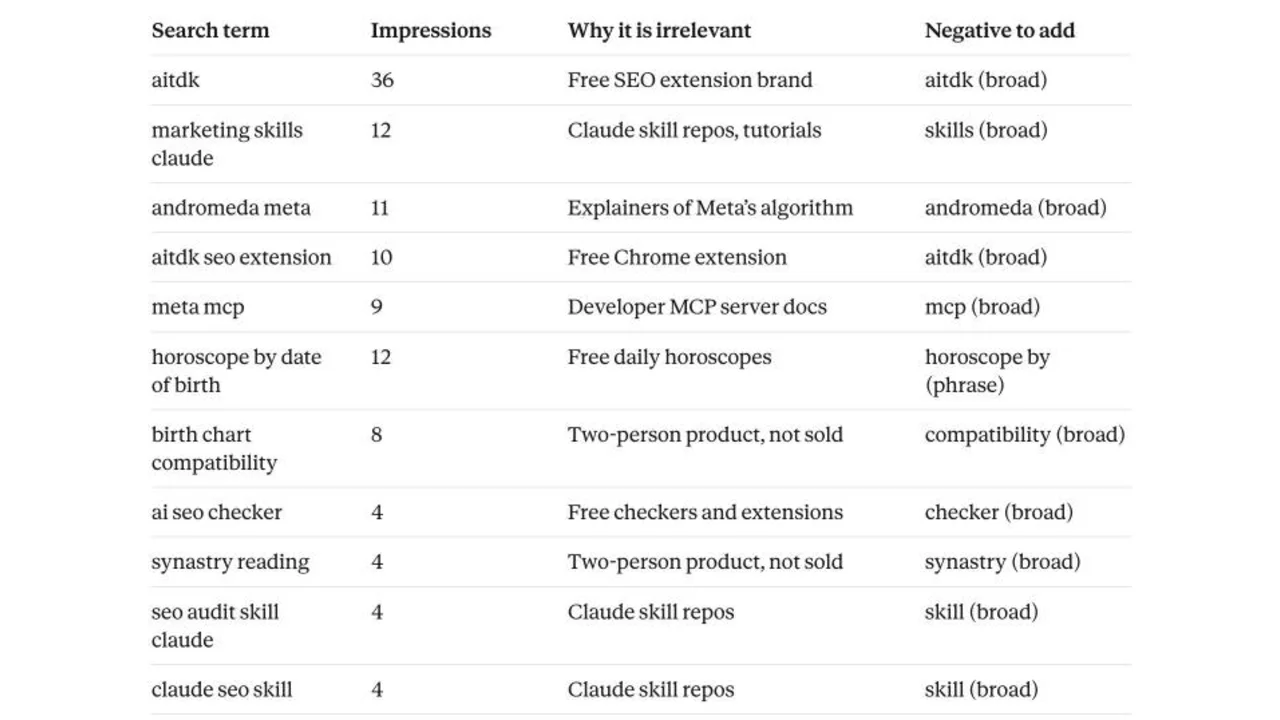
Check every suggestion before you add it
People skip this step, and it is the only one that can hurt you. For each negative, ask: which of my buyers' searches would this also block? From my runs:
horoscope by(phrase) is right. Those people want a free daily horoscope.mychartis right, and funny. "mychart astrology" got matched to my ads, but MyChart is a hospital patient portal.find my(phrase) is wrong. It blocks "find my birth chart reading", a buyer. I would add[find my birth chart]as exact match instead."extension"(phrase), suggested for my SEO campaign, is wrong. ShopPilot is installed as a Chrome extension, so it would block people looking for exactly that. The file does not contain your keywords or your product, so with a file this check is yours.
Two runs on the same data also disagreed: one called "synastry reading" BAD, the other UNCERTAIN. That is normal. UNCERTAIN means "not yet", and each one needs your own yes.
Pick the right match type for each negative
Negatives have three match types, and they behave differently from normal keywords. Google's example, from its negative keywords documentation, with the negative "running shoes":
| Match type | How you write it | What it blocks | I use it for |
|---|---|---|---|
| Broad | running shoes | Searches with all the words in any order: "blue running shoes", "shoes running". Not "running shoe". | Single words that are always junk for me, such as jobs or synastry |
| Phrase | "running shoes" | The words in this order, extra words allowed: "blue running shoes". Not "shoes running". | Phrases where order matters, such as "how to read" |
| Exact | [running shoes] | Only that exact search. Not "blue running shoes". | One junk search whose words also appear in buyer searches, such as [find my birth chart] |
The trap: negatives do not cover plurals, synonyms or close variants, as Google says on the same page. A negative job does not block "jobs", so a good list has both. In my own account, "compatible birth charts" slipped past an existing compatibility negative for exactly this reason.
Decide: campaign negative or shared list
A negative can sit on one campaign, or in a negative keyword list: a shared list you attach to many campaigns at once.
| Kind of junk | Where I put it | Example |
|---|---|---|
| Wrong for every campaign in the account | Shared list, attached to every campaign | jobs, salary, diy, internship |
| Wrong for one campaign, fine for another | Campaign negative on that campaign only | "book" is junk for my software campaigns and a buyer word for my birth chart book campaign |
| A place you do not serve | Campaign negative on that campaign only | Another city's name in a one-city campaign |
When in doubt, use the campaign. A shared list is a one-way street: whatever you add hits every campaign it is attached to. My software list blocks "how to", "free" and "book". Claude warned me not to attach it to a birth chart campaign, where it would block "birth chart book". A list holds up to 5,000 negatives, and an account can have 20 lists.
Add the negatives in Google Ads by hand
- Go to Campaigns, Insights and reports, Search terms.
- Tick the box next to each search term you approved.
- Click Add as negative keyword in the blue bar.
- Under Add as negative keyword to, choose Campaign. The default, Ad group, protects only that one ad group.
- Fix the text in the Negative Keyword box. Google fills in the whole search term as exact match, in brackets. Replace it with the negative you approved: no symbols for broad, "quotes" for phrase, [brackets] for exact.
- Click Save.
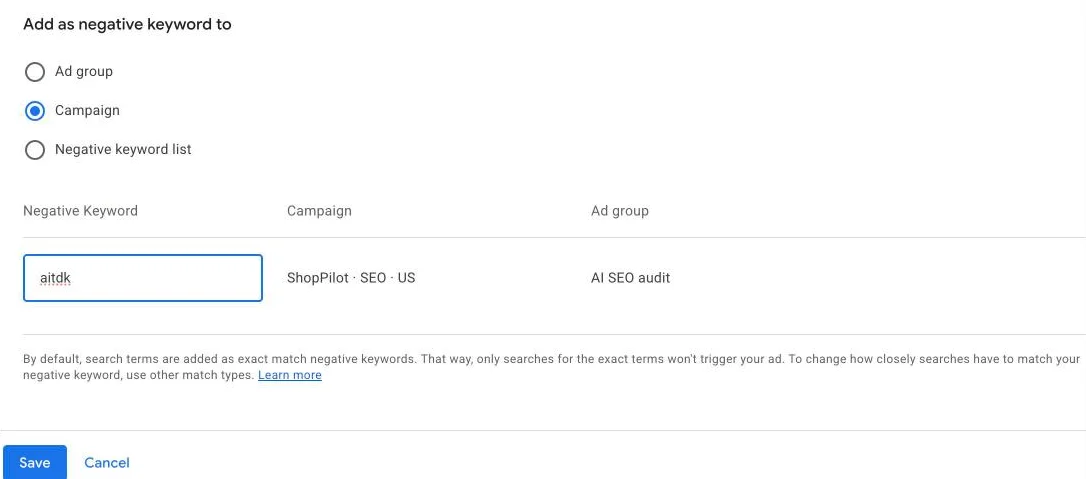
Most people miss step 5. The default blocks one search. The next person who types "aitdk extension" still sees your ad.
For a shared list, click Tools in the far left menu, then Shared library, then Exclusion lists. On the Negative keyword lists tab, click the plus button, paste one term per line, save, and apply the list to your campaigns, as Google describes. You can also choose Negative keyword list in step 4 above.
Or let Claude read the account and add the negatives
With a connector, Claude reads the search terms itself, checks your existing negatives and shared lists so it does not suggest duplicates, and sees your keywords so it does not block your own ad groups. Then it adds what you approve. Setup takes about three minutes: see How to connect Claude to Google Ads.
The prompt I used has the same rules. Claude pulls the data and reads existing negatives first:
Find negative keyword candidates in my Google Ads account "ShopPilot". Use the search terms from the last 12 months. Read only: do not change anything.

What I sell:
- ShopPilot campaigns: an AI marketing coworker for online stores. It works in the store owner's own Shopify, Google Ads and email tools. Monthly subscription.
- Birth chart campaigns: Novilunar, a personal birth chart reading, written for one person from their birth date, time and place. One-off purchase, $29.95. No live readings, no app, no free calculator.

Work in this order:
1. Pull every search term with its campaign, ad group, impressions, clicks, cost and conversions.
2. Read my existing negative keywords and shared negative keyword lists. Skip any term that is already blocked.
3. Split the terms by impressions. Terms with 100 or more impressions have enough data to judge on performance: flag those with high cost or a conversion rate well below their campaign's average. Terms under 100 impressions do not have enough data, so never flag them for having no conversions. Flag them only when the intent is clearly wrong for what I sell.
4. For every flagged term, search Google for it and look at the first page of results. Job listings, tutorials, courses, free tools, apps and definitions mean the searcher does not want to buy. Pages selling what I sell mean keep. A mix means uncertain.
5. Give each flagged term a verdict, BAD, UNCERTAIN or KEEP, with one line saying why.
6. For each BAD term, suggest the negative keyword: the shortest word or phrase that blocks the bad intent without blocking buyers. Say the match type (broad, phrase or exact) and where it belongs: on the campaign, or in a shared list. Use a shared list only for intent that is wrong for every campaign, such as jobs.
7. Never suggest excluding words my buyers use: reading, report, book, personalized, best, accurate, detailed, in depth.

Show one table sorted by impressions with these columns: Term | Campaign | Impressions | Verdict | Why | Negative to add | Match type | Where | Cost. Then stop and wait for my approval.
Check the list as in step 3, then ask for the change by name:
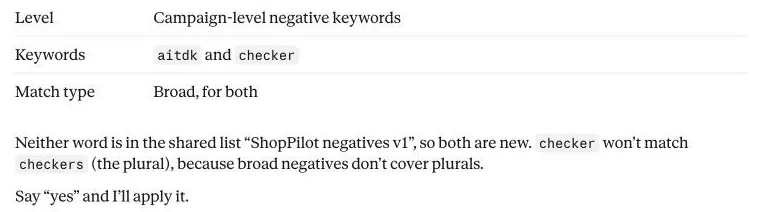
Prepare aitdk (broad) and checker (broad) as campaign negatives on ShopPilot · SEO · US. Show me the preview of the change. Do not apply it until I say yes.Claude shows a preview with the level, the negatives and their match type. Nothing changes until you answer yes.
If Claude says it cannot use the connector, it is probably switched off for that chat. Claude shows a panel named Your connectors with a switch. Turn it on and ask again.
Words that look like junk but are buyers
Many universal lists online block words that are your best traffic. For a service business, I never add these:
| Word | Why it looks like junk | Why I keep it |
|---|---|---|
| affordable | Looks like a bargain hunter | "Affordable plumber" is someone on a budget who is ready to buy |
| price, pricing, cost | Looks like a tire-kicker | Someone comparing prices is close to buying |
| quote | Looks like research | "Get a quote" is someone about to fill in your form |
| best, review, reviews | Looks like research | Someone comparing options is choosing who to buy from |
| hire | Looks like someone learning how to hire | "Hire a plumber" is someone who wants to hire one |
| near me | Looks vague | For a local service, it is one of the strongest buying signals there is |
Some of these flip with what you sell, so think, do not copy. My birth chart reading arrives by email, so "birth chart reading near me" is someone who wants to sit with an astrologer. I block near me there. Lead-generation lists keep "free" because "free quote" is a buyer. I sell a $29.95 product and "free birth chart" is the most searched phrase in my niche, so free is my most valuable negative.
A starter list for day one
Because the report hides low-volume searches, I start every account with a shared list of universal junk, attached to every campaign, all broad match. The core of mine:
jobs
job
hiring
career
careers
salary
internship
resume
diy
tutorial
template
course
courses
training
certification
what is
meaning
definition
wikipedia
reddit
complaint
refund
login
Check it against your buyers first: if you sell courses, delete the course lines. Then run the review weekly for the first month or two, until new junk becomes rare.
Frequently asked questions
Should I exclude every search term with no conversions?
No. A term with a handful of impressions has not had a chance yet. Judge a term on its numbers only once it has around 100 impressions. Below that, exclude it only when its intent is clearly wrong for what you sell.
I added a negative keyword and my ad still shows for that search. Why?
Usually the match type. A negative added from the search terms report is exact match by default, so it blocks one exact search. Negatives also do not block plurals, so job does not block "jobs". And a negative after the 16th word of a long search does not block it.
Can Claude add negative keywords to Google Ads directly?
Not from an uploaded file: then you add them by hand. With a connector that can change Google Ads, such as Adchestra, Claude adds them for you, showing each change as a preview and applying it only after you approve.
Should negatives go on the ad group, the campaign or a shared list?
The campaign, by default. Use a shared list only for intent that is wrong for every campaign, such as job seekers. Use an ad group negative only to steer a search from one of your ad groups to another.