 Adchestra
Claude does not know how your site ranks
I asked Claude which pages of my own site rank on page two of Google and which queries to improve first, and told it not to use connectors or web search. It did not invent a list. It said the ranking data lives in Search Console and that any list it gave me would be made up.
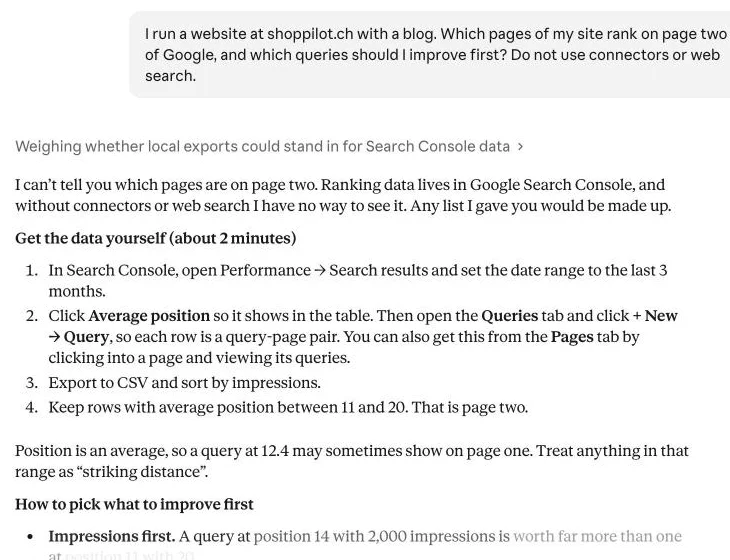
That answer is the whole guide. People type "claude seo" into Google about 720 times a month, and the videos that come up promise a Claude skill will "rank you #1". Nothing can promise that. Claude without your data writes generic advice you could read anywhere.
With your data it is different. Search Console is Google's free tool that shows how your site appears in Google Search: which searches show your pages (impressions), how often people click (clicks), and where your page sits in the results (average position). Give Claude that, and it does four jobs very well:
- Finds pages on page two and says what to change.
- Finds searches with many impressions but few clicks, and rewrites the title and description.
- Finds searches you rank for by accident that deserve their own page.
- Checks pages that lost visibility and separates facts from guesses.
I do all four on two real sites of mine, adchestra.com and shoppilot.ch, with every prompt in full. Setup takes 10 minutes, each job a few minutes.
Two ways to give Claude your Search Console data
| Way | Cost | Time | Pick it if |
|---|---|---|---|
| Export from Search Console and upload the files | Free | 10 minutes | You do an SEO review a few times a year, or you want to pay nothing |
| Adchestra, which reads Search Console for Claude | 10 requests free, then a 14-day trial, then $2.95 a month | 3 minutes to connect | You want to ask follow-up questions and compare periods without downloading new files each time |
Both ways meet at step 3.
Way 1: Export your data and upload it
You need your site added in Search Console. If not, Google explains how to add a property.
- Open Search Console, choose your property, then click Performance and Search results in the left menu.
- Click the date filter at the top and choose Last 3 months.
- Switch on Average position. Claude needs it for every job below.
- Open the Queries tab and click Export at the top right. Google says many reports have an export button for the chart and table data. Choose Download CSV.
- Do the same on the Pages tab.
- For the page-two job you need queries per page. Click one page in the Pages table, open the Queries tab and export again, for your five or six most important pages.
On a big site a connector saves real time, because Search Console shows queries for one page at a time.
In a new Claude chat click plus, then Upload or add files, and attach every CSV. Start every prompt below with this sentence instead of the connector one:
Attached are my Search Console exports for [SITE], last 3 months. Use only the numbers in the files. Do not use connectors or web search.Now skip to step 3.
Way 2: Let Claude read Search Console through Adchestra
Adchestra is the hosted connector I built with my co-founder. You add one address to Claude and sign in with Google. The clicks are in How to connect Claude to Search Console. The address is:
https://mcp.adchestra.com/mcpA connector can be switched off for a single chat. Click the plus button, open Plugins (or Connectors) and check that Adchestra is on.
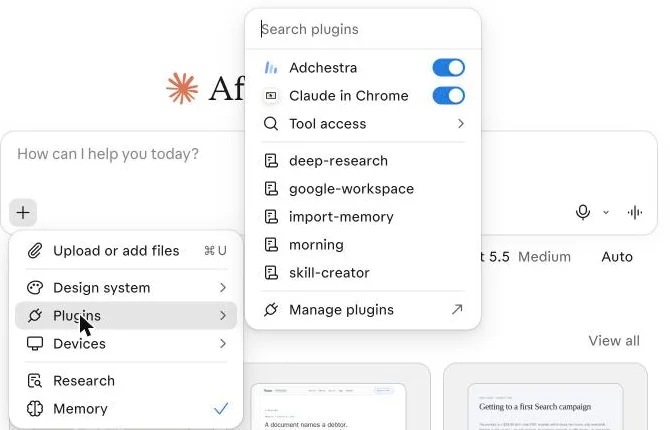
Every prompt below starts with this sentence:
Use the Adchestra connector to read the Search Console data for [SITE] for the last 90 days. Read only. Do not change anything. Use only numbers the connector returns and do not use web search.Adchestra only reads Search Console. Claude proposes, and you edit your own site.
Job 1: Find pages on page two and what to change
A page on page two sits roughly at average position 11 to 20. These pages are close to page one, and a small change can matter more than a new article. Google defines average position as the position of the topmost result from your site, so it is a guide, not a fixed rank.
My prompt:
[START SENTENCE FROM STEP 1 OR 2]
Find the pages that rank on page two of Google: average position between 11 and 20 for a query on that page. Put them in a table with page, query, impressions, clicks and average position, sorted by impressions. If there are only a few, also include queries from position 21 to 30 and mark them as page three. Then, for the three pages with the most impressions, tell me what to change on the page: the title, the headings, content to add or a link to add from another page. Say plainly what you cannot know from this data.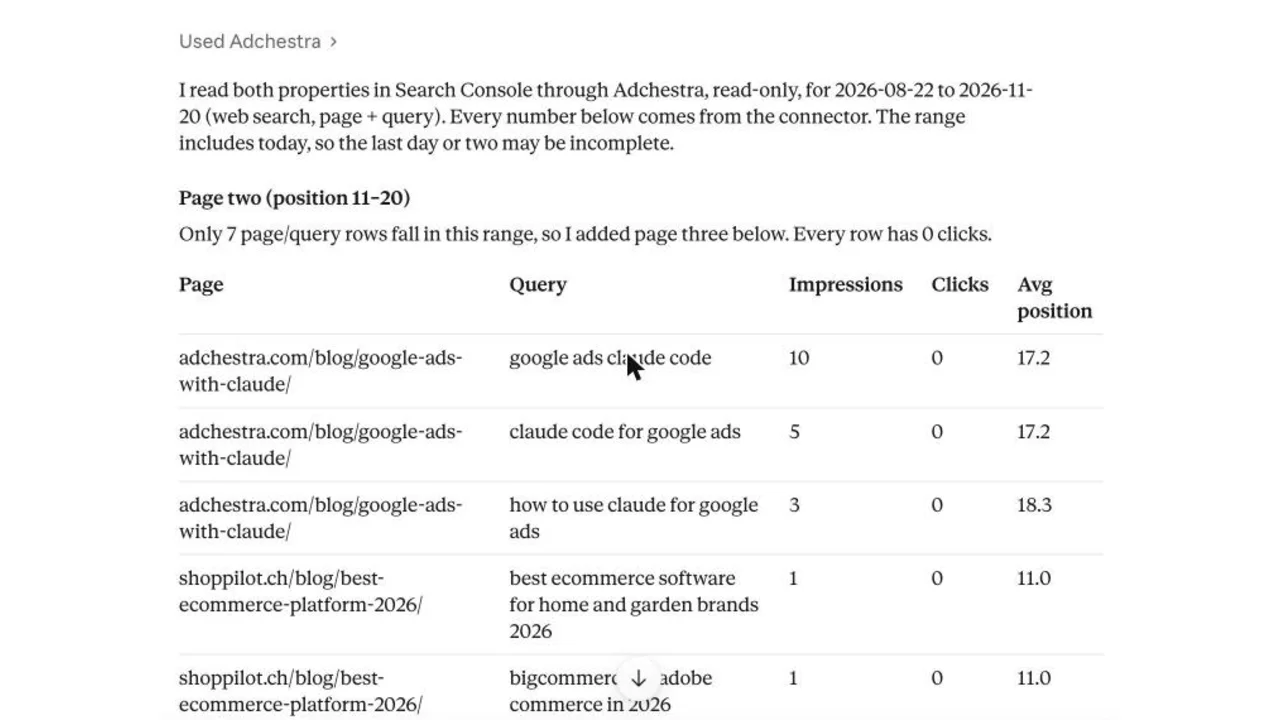
Claude found seven rows in about a minute. The best three were all on my Claude and Google Ads guide: "google ads claude code" (10 impressions, position 17.2), "claude code for google ads" (5, 17.2) and "how to use claude for google ads" (3, 18.3). It also noticed that "claude for google ads" showed 164 times at position 45.6, which is page five.
It told me to:
- Put "Claude Code" and "Google Ads" in the title, the words of all three queries.
- Add headings for using Claude Code with Google Ads and "How to use Claude for Google Ads".
- Link to the page from the homepage and a related guide with the same words as link text.
What I do with the answer
Claude said it had not opened the pages, so it did not know my title, headings or links. That is why I never apply this blindly. I open the page, check whether a Claude Code section already exists, and only then use the list. If it does, the fix is the title and one link. If not, the section is the job.
It also said a row with one impression is not worth real effort. I agree.
Job 2: Find searches with impressions but no clicks and rewrite the title
When your page shows high in the results and nobody clicks, the line people read is the problem. It is made of the title (the blue link) and the description (the grey text under it). Claude writes these well, if it writes them from the words people actually searched.
[START SENTENCE FROM STEP 1 OR 2]
Find the pages and queries where I get many impressions but almost no clicks, and where the average position is 10 or better, so a click should be likely. Show the top five pages as a table with page, impressions, clicks, click-through rate and average position, and name the two or three queries that bring most of the impressions. Then pick the page where a better title and description would matter most. Its current title is "[CURRENT TITLE]" and its current description is "[CURRENT DESCRIPTION]". Write three new title options under 60 characters and one new description under 155 characters, in plain words, based on the queries people actually used to reach it. Show the result as before and after. Do not promise any ranking or click gain, and tell me what I should check before I change anything.
Find your current title and description with right click, View page source, and a search for <title>.
On shoppilot.ch the homepage had 4,370 impressions, but 4,085 were for the brand name. A better title does little for people who already know your name. Claude skipped it and picked my ecommerce platform comparison: 713 impressions at average position 5.5, where people choose from a list of competitors.
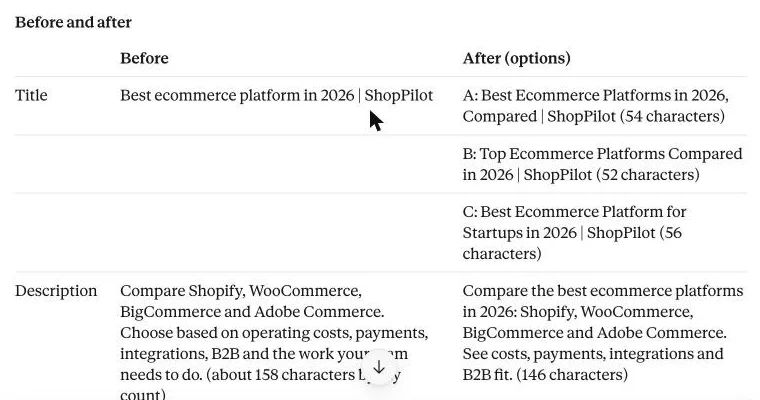
| Before | After (Claude's best option) | |
|---|---|---|
| Title | Best ecommerce platform in 2026 | ShopPilot | Best Ecommerce Platforms in 2026, Compared | ShopPilot |
| Description | Compare Shopify, WooCommerce, BigCommerce and Adobe Commerce. Choose based on operating costs, payments, integrations, B2B and the work your team needs to do. | Compare the best ecommerce platforms in 2026: Shopify, WooCommerce, BigCommerce and Adobe Commerce. See costs, payments, integrations and B2B fit. |
It tied each option to a real search: the plural "platforms" follows "best ecommerce platforms in 2026", the biggest non-brand query it saw. A new title is a test, not a promise. Change it, then compare clicks for the same query over 28 days before and after.
What to check before you change a title
- Google may not show your title. Google says title links are generated automatically from the page content and references to it on the web, and the snippet comes mostly from the page, with the meta description used when it describes the page better. Search your page in a private window and read what you really see.
- Change one thing and write the date down. Google says changes can take from a few hours to several months to show. Claude suggested comparing 28 days before and after. So would I.
Job 3: Find queries you rank for by accident
I like this job most, because it finds articles you did not know you needed. Some pages rank for searches they were not written for: they mention the topic in one paragraph, and Google shows them anyway. If several such searches cluster around one topic, it wants its own page.
[START SENTENCE FROM STEP 1 OR 2]
Find queries I rank for by accident. These are queries where one of my pages shows up in the top 10, but the page was not written for that question, so the page only touches the topic in one paragraph or one table row. Group them by topic. For each topic that has several queries, give the queries with impressions and average position, say which page ranks today, and say whether the topic deserves its own page or should stay a section. For the two best topics, write a working title, an outline with five to seven headings and the one question the page must answer in its first paragraph. Say what you cannot know from this data, for example how many people search for each topic.
On shoppilot.ch, Claude grouped the queries of my comparison page into seven topics. Two stood out. One was head-to-head comparisons: "squarespace on shopify plus vs. adobe commerce" at position 4.9 and "is squarespace better than bigcommerce" at position 10. Its verdict: a different question from "which platform is best", so it deserves its own page.
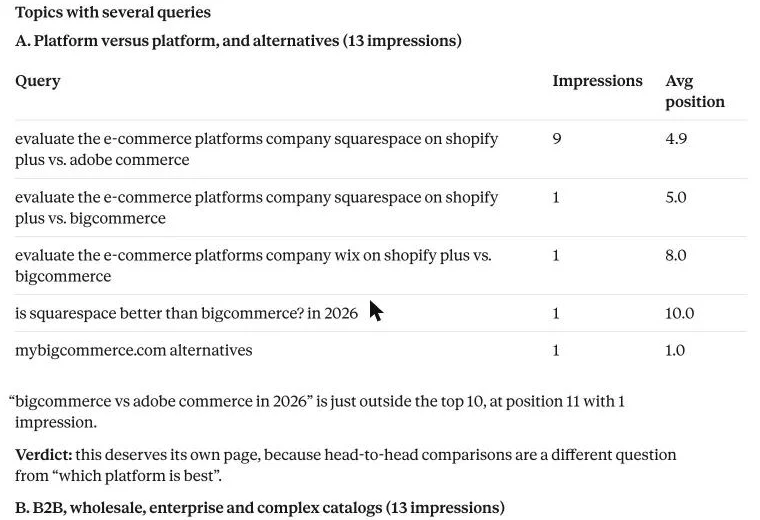
The other was B2B and wholesale: "which e-commerce platform offers quote to order functionality" at position 1 and "best enterprise ecommerce platforms 2026" at position 7. It proposed this page:
| Part | Claude's draft |
|---|---|
| Working title | Best B2B Ecommerce Platforms in 2026: Quote-to-Order and Complex Catalogs |
| First paragraph must answer | Which ecommerce platform can handle quote-to-order and large, attribute-heavy catalogs for B2B and distributor sales without heavy custom work? |
| Outline | What B2B selling needs, quote-to-order, selling as a distributor, products with many attributes, enterprise versus mid-market, how to shortlist vendors. |
Two cautions from Claude are worth copying. "Accidental" was its inference, because it had not read my page. And it said, unprompted, that it had not verified how any platform behaves, so each fact in the new page needs research. I take the outline and write the facts myself.
It cannot size a topic either: impressions only count how often your page appeared. For search volumes use real Keyword Planner numbers, never Claude's memory.
Job 4: Find pages that lost traffic and why
Claude can compare two periods, find the day a page started to slip and list causes. It cannot see inside Google, so make it separate what the data shows from what is a guess.
[START SENTENCE FROM STEP 1 OR 2]
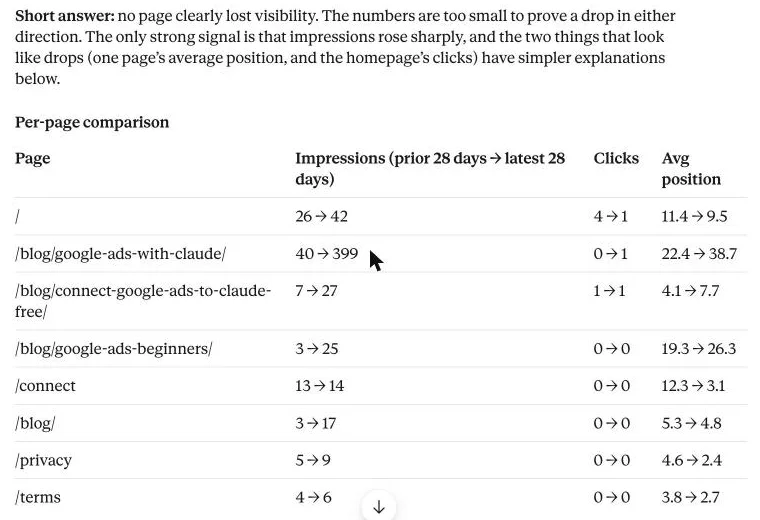
Look at [SITE] and find pages that lost visibility. Compare the last 28 days ([START DATE] to [END DATE]) with the 28 days before ([START DATE] to [END DATE]), per page, with impressions, clicks and average position for both periods. Use the daily numbers for any page that looks like it dropped, to see the day it started. List what could explain the drop, separate what the data shows from what is only a guess, and give me the checks I should do outside Search Console to tell the guesses apart, for example looking at the page's recent edits, the live search results, the indexing status and the Google Search status dashboard. Tell me honestly if the numbers are too small to say anything.
On adchestra.com the answer was a useful surprise. My Claude and Google Ads guide looked like it had fallen from average position 22.4 to 38.7. Claude pulled the daily numbers and showed the page had no impressions before 16 October, so the earlier period held only its first eight days. Then it did what most guides skip: it compared the queries that appeared in both periods.
| Query on the same page | Earlier 28 days | Latest 28 days |
|---|---|---|
| connect google ads to claude | position 97.5 (2 impressions) | position 66.0 (21 impressions) |
| google ads to claude | position 70 (1 impression) | position 48.1 (23 impressions) |
| how to connect claude to google ads | position 55 (1 impression) | position 33 (2 impressions) |
Same queries, better positions. The average got worse because the page started to appear for many new, broader searches, like "claude for google ads", where it sits deep. An average position can fall when a page wins more searches. Had I rewritten that page in a panic, I would have fixed nothing.
Its checks outside Search Console are the ones I would use: the page's edit history, the URL Inspection tool (Google explains what it shows for a page), your main queries in a private window, and Google's Search Status Dashboard. Its verdict was that no page clearly lost visibility, so run the comparison again in four to eight weeks. A tool that says "this is not a drop" beats one that always finds a problem.
What I would not let Claude do for SEO
Do not ask it for search volumes
Claude invents them. In my test its numbers were off by up to five times, see How to do keyword research with Claude. Use Keyword Planner numbers and tell Claude to use only those.
Do not believe a ranking promise
Google says there is no guarantee that any particular site will be added to its index, and following its guidance only makes showing up more likely. A video that promises "#1 in 7 minutes" is selling a title. What Claude can give you is a faster review of your own numbers.
Do not publish whole articles nobody edits
I write my guides by doing the job myself, in the real account, with the real clicks. That is why they help. I have no patience for sites that publish 200 untouched Claude articles, and the reason is practical. Google says using generative AI to produce many pages without adding value for users may violate its spam policy on scaled content abuse, while AI can help to research a topic and add structure to original content. That is how I use it in jobs 1 to 4: Claude reads numbers and drafts a skeleton, I bring the facts and the experience.
Frequently asked questions
Can Claude do SEO for me?
It can do the analysis and first drafts: finding pages worth improving, writing titles, outlining new pages and explaining a traffic drop. It cannot know how your site performs without your Search Console data, and it cannot make Google rank you. You decide, check the facts and edit your site.
Do I need Claude Code for SEO?
No. Everything here works in the normal Claude chat with a file upload or a connector. Claude Code helps if you want to edit your website's files directly, but it does not know your rankings either. It needs the same Search Console data.
Does Google penalize AI-written content?
Google says that generating many pages without adding value for users may violate its spam policies. The problem in that text is pages that exist only to fill space, not AI as a tool. Content that helps the reader and is checked by a person is the safe side.
How long until a change shows up in Google?
Google says changes can take from a few hours to several months, and not every change has a visible effect. I note the date and numbers before a change, wait a few weeks and compare equal periods.